Old zgemma h5 2tc box, what is the best updated software I can run on it?

phl

Newbie
Hi, have an old zgemma h5 2tc box, I think the only thing we can get on it it freesat?, what is the best updated software I can run on it? I tried to just update the channels, with the build It had on it (10 years ago wooshbuild), channels updated but iuuse with the updatedproviders incaopatible v 3.1 > 3.4? autobouquets maker needs updated for it to work. any help welcome. thanks if i just get him freesat working he will be happy.
 
OpenATV will work for you as well as OpenPLI. Some other teams also make images for the receiver. Check official image download sites to confirm.

If you like Sky skins, install ATV then kiddacs skins from the plugin server using your remote.
 
Thanks for the info, I tried to load OpenATV, ie downloded put on usb, put it in the box restarted it and wooshbuild keeps starting up, Ive tried both usb ports, Ive tried 2 usb sticks, but can't get this to load, any ideas?
 
Whooshbuild is just ATV with some changes. Are you still able to "flash online". It should be accessible via blue button menu.
 

This guy: linesman66 got my box working, Thanks !!!​

How to flash Zgemma H9x/H9.2x Series​

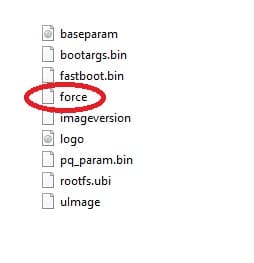
Download latest firmware. If “noforce” file is present in the h9 folder please make sure to rename it to “force

3.jpg


  1. Use FAT32 formatted USB stick
  2. Send the h9 folder and 2 files (“bootargs.bin” and “fastboot.bin”) to the clean USB memory stick and then take it out of your PC properly expelled first
  3. Switch off your Zgemma H9 at the back, using the white power button
  4. Insert the USB stick into the back USB port of your H9
  5. Press and hold the small, black RESET button at the back, then
  6. Press the white POWER button, while holding the RESET button
  7. Let go of the RESET button once you see the LED flashing (changing colour between white and red)
  8. Wait for the box to load after the installation.
 
Back
Top