Purchase my own router

My existing router is huawei echolife eg8145v5 router under the bottom of it it gives an ip address that when I enter it it does not open however I tried a recommended router ip which then gave me the username and passsword boxes but entering what is on the bottom of the router I just get the message that its the wrong password or login. So I guess the box is locked to my isp. I cannot change the DNS
 
My existing router is huawei echolife eg8145v5 router under the bottom of it it gives an ip address that when I enter it it does not open however I tried a recommended router ip which then gave me the username and passsword boxes but entering what is on the bottom of the router I just get the message that its the wrong password or login. So I guess the box is locked to my isp. I cannot change the DNS
Maybe it is locked but you can get apps that can change the dns on your device or you can change it manually on your device.
The best way is on the router if possible.
How to change manually on device 👇🏻

 
My existing router is huawei echolife eg8145v5 router under the bottom of it it gives an ip address that when I enter it it does not open however I tried a recommended router ip which then gave me the username and passsword boxes but entering what is on the bottom of the router I just get the message that its the wrong password or login. So I guess the box is locked to my isp. I cannot change the DNS
Just a sugestion have you tried another iptv provider test .
 
Just a sugestion have you tried another iptv provider test .
Yes I have several different providers but it makes no difference I am convinced its my isp and we have no real alternatives here in Spain, hence wondering if a change of router might improve the situation but I guess not.
 
Changed DNS on Firestick, buffering even worse tried both 8888 and 1111 both worse during GP qualy and live football, in fact it was impossible to watch anything
 
Have you tried using your phone on a4g/5g connection ? You could get a 4g/5g router and sim if that works.
Have you done speed tests while it’s fine and then when you have trouble ?
Which gen of firestick have yougot ?
What speed is your internet ? Who else is using it when you are ?
 
My first call would be factory defaulting the router and starting from scratch. You have the default username and password on the router as you said to login once you have reset it. Maybe download a few guides or vid clips before resetting it for your specific make and model to help you if you aren't sure and surely you can call the ISP for support.
Strange that you can't access it using the default username and password and surely you would have known if you'd changed the password. Is someone else using your router along with you I wonder. This would be my worry at the moment!
 
Just a quick update and a thanks to all
I think my router or internet connection has been hacked, by somebody close by, so I have requested that my isp change my router password to see if that makes any difference, but still considering purchase of a router and bridging with my current isp supplied router, as I am still experiencing signal drop out frequently and also on my phone when using WhatsApp video chat.
 
Just a quick update and a thanks to all
I think my router or internet connection has been hacked, by somebody close by, so I have requested that my isp change my router password to see if that makes any difference, but still considering purchase of a router and bridging with my current isp supplied router, as I am still experiencing signal drop out frequently and also on my phone when using WhatsApp video chat.
Not only will you need to change the router password if someone has been connected but you will need to change the password of any SSIDs being broadcast as they will still be connecting to your wireless otherwise
 
Thanks all and have now agreed with my isp that I will change my login details and password and they will reset the router once I have informed them of the new password. I guess that's the best I'm able to do, but I used Fing that confirmed an unknown iPad is logged into my router. So i need to get rid of this parasite whoever they are. Just a pain to reload all my own equipment back but hey it will be worth it to get rid of my unwanted guest
 
Thanks all and have now agreed with my isp that I will change my login details and password and they will reset the router once I have informed them of the new password. I guess that's the best I'm able to do, but I used Fing that confirmed an unknown iPad is logged into my router. So i need to get rid of this parasite whoever they are. Just a pain to reload all my own equipment back but hey it will be worth it to get rid of my unwanted guest
I would suggest having a go at this yourself mate as it's not as hard or complicated as you may think. Watch a few videos or ask your ISP for a setup guide/Instructions. You can always fall back on your ISP for support should you get stuck but this will give you the confidence to reset it in future if needed or setup another router should you purchase another.
Just make sure you don't leave any default passwords, always change them. Could it be a neighbour you know and has been in your home and they've made a note of your password?
Or maybe it's simply a weak default password or one that is the same for all that make and model of router. If this is the case, then it must be an old router and I would suggest replacing it. Check the age of the router with your ISP and ask about the possibility of a free upgrade. They can only say no.

Just checked your router and it looks like it's only been released 2023 but a quick search and the default login details are admin and password is "root"
Pretty poor this on a router only a couple of years old.
That's how this iPad has connected. Took me less than 10 seconds to get them login details.
 
Last edited:
leemoo its a neighbour that has obviously seen my password as all these issues only started the day they after they arrived, they have the upstairs apartment to me and I know that my signal is pretty strong up there.
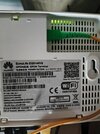
Strange about my router as I took the picture of the base with its passwords etc and when i typed in the ip address into my laptop 192.168.18.1 I get the error message 'This site cant be reached'
I tried 192.168.100,1 the login/password but that just said the same as before Incorrect User Name/Password combination. Please try again.
 

Attachments

  • IMG_20250920_080404.jpg
    IMG_20250920_080404.jpg
    1.9 MB · Views: 121
Last edited:
leemoo its a neighbour that has obviously seen my password as all these issues only started the day they after they arrived, they have the upstairs apartment to me and I know that my signal is pretty strong up there.
Strange about my router as I took the picture of the base with its passwords etc and when i typed in the ip address into my laptop 192.168.18.1 I get the error message 'This site cant be reached'
I tried 192.168.100,1 the login/password but that just said the same as before Incorrect User Name/Password combination. Please try again.
Can you not just reset the router that should put it back to default
 
Yes but I do not know any of the setting to reconnect to my account as the router is set to my isp's details, it's a locked router all I have is my current internet password that my isp used to set the router up.
If it was my own router that I had full access to it I would do that, but resetting the router back to default would just kick me out and I would then have to get my isp to reset all their stuff
 
Yes but I do not know any of the setting to reconnect to my account as the router is set to my isp's details, it's a locked router all I have is my current internet password that my isp used to set the router up.
If it was my own router that I had full access to it I would do that, but resetting the router back to default would just kick me out and I would then have to get my isp to reset all their stuff
All your details are on bottom of router default IP address and default username and password for router then your default sid for 4g an 5. + WPA password.

that is why those are there .

What to expect after a reset:
  • All custom settings, network names (SSID), and passwords will be erased.


  • You will need to reconfigure your network and connect devices using the default settings found on the router's nameplate.

    Your problem asyou think is neighbour already has those details but idf you reset then change default login passwords to router then he cannot get access
 
I think I said above that when I try to login using the address and the login details as per the bottom of the router I get the error message 'this site cant be reached'.
So what is on the bottom of my router does not correspond to any log in details including the IP address.
I cannot log into it, if I do a reset I have no idea what it will reset too as it's not my router it's a supplied router.
I am not willing to try anything unless I can recover from it, I certainly don't have the skills or understanding, so I am going to ask my isp to change my password with one I will supply them with
 
Back
Top