WilloBuild WilloBuild OpenViX 6.9 Series

Ok I will take a look. My Zgemma has got slow in every way. Boot up , changing channels etc. I wasn’t sure if it is hardware related so thought maybe a new box. I’ll try another re flash but have to keep asking my provider to change over the line I’d on xe. Do you think it could be the box playing up ?
 
Is the HDD filling up? Every time you flash my build it makes a #Backups# folder containing your existing important settings, just in case.
Every subsequent flash creates a new #Backups# folder and appends the date to the old one.
I never considered that they would perhaps need pruning one day. Bouquet Backups are the same.
 
That box is mutiboot you should try another partition and load a brand new image ie set up from scratch. Where is epg stored? You should see in recordings space left on HD.
 
it is a fresh install on another partition. Ive deleted all other back ups apart from the newest one. I’ll see how it goes bug doesn’t seem any quicker at the moment.
 
Hi
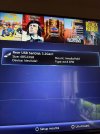
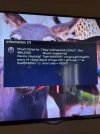
I’ve got an ab pulse 4k to replace my Zgemma h7s but I’m struggling to get the usb to mount as shown in the guide. It’s a 128gb micro sd. I’ve been trying and formatting it and can’t get the device to show /dev/sdd1 and the type ext4 R/W I’ve got the attached. Any ideas as I’ve formatted multiple times and downloaded software to do it. I’ve also tried a larger usb 512 which was in the old Zgemma but no luck.
 
It’s initialised but I can’t get the device right and it says mount failed.
 

Attachments

  • image.jpg
    image.jpg
    2.3 MB · Views: 8
  • image.jpg
    image.jpg
    2.2 MB · Views: 8
I've just initialised a 256gb MicroSD card and mounted it as /media/usb and it's not showing in the ViX mount manager.
It is mounted when I look in DreamExplorer and from my PC though.
There might be an issue with the ViX Mount Manager 🤔

mm.jpg


de.jpg
 
Ok so it might not be me 😁. But what do I do now. I’m just going to initialise a 128gb micro sd and see what happens with that. Is the sda1 a problem by device as your guide shows sdd1
 
I always use an internal SSD as storage for EPG, Picons, Backups etc.
All of my recordings go direct to my NAS and movies are also on the NAS.
I don't really have much experience with mounting USB's or MicroSD.
All I can really say is, make sure that you are only mounting one device at a time and a full reboot often works wonders.
 
No luck with the micro sd card 🤷‍♂️. I get closer with the 512 gb usb stick but just won’t mount. I’ve been trying for 4 hours now so I’ll try again tomorrow and hope for a miracle. It was mounted in the Zgemma so I don’t think the stick is knackered but out of ideas
 
No luck with the micro sd card 🤷‍♂️. I get closer with the 512 gb usb stick but just won’t mount. I’ve been trying for 4 hours now so I’ll try again tomorrow and hope for a miracle. It was mounted in the Zgemma so I don’t think the stick is knackered but out of ideas
Flash open ATV on another slot and see if that works. If it doesn't then the hardware is the issue. If it does then the openvix imagine you are using is corrupt. Abu follows this thread one of the developers he will reply I'm sure.
 
Flash open ATV on another slot and see if that works. If it doesn't then the hardware is the issue. If it does then the openvix imagine you are using is corrupt. Abu follows this thread one of the developers he will reply I'm sure.
I never had much luck with micro sd cards on H7 using ATV, they would mount and within days, they would disappear, the system couldn't see it. Normal usb sticks worked fine
 
Back
Top