Online flashing of zgemma-star H.2S (from Whoosh 5 to Whoosh 6)

aphuk

Newbie
Is it possible to reflash my box without having to download the latest Whooshbuild? I seem to remember there was an option in the menu somewhere to flash the box whilst directly connected to the internet (my zgemma is permanently wired to my router)

My current build info is below
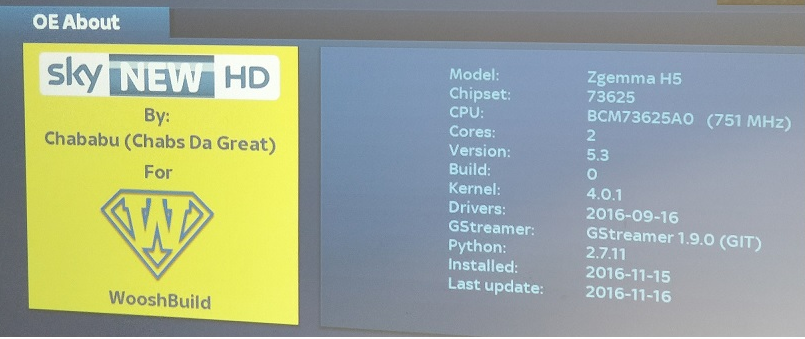
upload_2017-9-4_15-52-55.png
 
Last edited:
From TV picture press the Green button and then select WB Config, scroll down to the very end and should see an option to update
 
Main question here is that I have a 2Tb HDD connected to the USB port with all my recordings on. Will it be affected by the upgrade to Whoosh 6 ?
 
no, make sure when prompted to backup settings you say yes and then once flashed make sure you go into wb config and restore your settings, this will ensure your line and timers etc aren't lost etc
 
Final question (hopefully) ...
I recently made the mistake of installing XCplugin in order to try out a Gift. It was cr*p and I want to get rid of it. Will the reflash of my box remove all manually installed (by me) plugins. If not, how do i bin it as it is utter rubbish.
 
yes, a reflash will take it back to the basic wooshbuild. BUT when you have flashed and do the restore settings it may ask you if you want to reinstall plugins during the restore, select NO. otherwise all the plugins you have added may be reinstalled
 
Thanks grog. May have hit a snag on the upgrade though as when I hit the GREEN button (from TV view) and then select WB Config/option to update/ it is offering me Whoosh v5.003.
based on the statement on the Whoosh website download page...
"The latest and best version of WooshBuild is v6. Those running previous versions are encouraged to upgrade as soon as possible due to the ease of v6."
...I have downloaded BaseBuild-v2-wooshbuild-H2S.zip from the Whoosh website. I have unzipped it and got two folders
misc-files
zgemma
and am hoping that I can just copy these folders on to my zgemma and then reflash directly from the box or do I have to put them on a USB stick ?
 
Yes copy the folders onto the USB stick, check inside the zgemma folder and if there is a file called noforce rename it force. Turn box off. Insert USB stick and turn back on.

REMEMBER TO BACK UP SETTINGS FIRST - otherwise you will loose your line etc. If you have your line stored on pc anyway and you're not bothered about timers then this isn't such a big deal
 
Thanks Grog.
Before I proceed and just to clarify;
1.
The unzipped BaseBuild-v2-wooshbuild-H2S has a zgemma folder (along with the misc-files folder which I don't think I need to copy across)
The zgemma folder contains a folder called
H3 (which contains a file named 'Force') so if the folder structure is OK then I am set.
2.
What file format does the USB stick have to have and does it go in the front or rear zgemma USB port ?
3.
As I have direct access to my zgemma (hardwired network with the zgemma mapped to my laptop) can I backup my config settings locally to a drive on the zgemma and then copy them across to my laptop before I rebuild?
 
Last edited by a moderator:
format the usb to fat32 for flashing. your file structure is correct.

You can do backup settings and then open file explorer on laptop and browse network, double click on zgemmah2s (unless renamed it) and then HardDisk. You will then see a backup folder, (can't remember name offhand but its obvious) which you can drag to somewhere on your laptop.
 
Hi, does anyone no how to add line to the new wooshbuild, there isn't a newcamd.list file to add to, i've redone my Zgemma H2s box and now don't know where to add my line, don't know if anyone else does but I did still get BT sports so was hoping to add the line back.
 
Hi, does anyone no how to add line to the new wooshbuild, there isn't a newcamd.list file to add to, i've redone my Zgemma H2s box and now don't know where to add my line, don't know if anyone else does but I did still get BT sports so was hoping to add the line back.

Do you still have your line details? Either newcamd.list or CCcam.cfg .
This file goes into user/keys.
If you don't have the files but do have the line details then, you can just use Notepad to paste your details into making sure that the files is named as above with no "txt" suffix.

If so just put it on a USB stick formatted to FAT32 and use Cam Importer.

Green + second plugin down.

If you like PM me with the line details and I will mail you back the file.
 
Last edited:
Hi, thanks for the quick reply. It wouldnt see Fat32 it will only see Fat default but it doent open the notpad file, just shows 'Go Back
 
it shouldn't be a notepad file, it should either be CCcam.cfg file or newcamd.list file

you edit them with notepad but don't save them as text files
 
http://www.techkings.org/threads/wooshbuild-v5-support-thread.109525/

Post 3 spoiler 4 you can download the files you need whether it be newcamd or ccam
Paste your details in and save
Then either put the file on usb and use the cam importer. Or using file explorer on your computer, put the file on your hdd then run the cam importer.

You said you had re-done wooshbuild did you backup your settings? Did you then go back into wb config and restore your settings. As this should also bring your line back
 
Oh dear ....
Formatted USB stik to FAT32
Copied across full folder structure as extracted from BaseBuild-v2-wooshbuild-H2S
zgemma
misc-files
Powered off zgemma
Put USB stick in rear port (where my 2Tb USB HDD normally is)
Powered on
Box starts up with splash screen saying Whoosh 5
Got ERROR message referring to TIMESHIFT with ref' to EXT2, EXT3 ?!!
no reflash appears to have occurred.

Powered off
removed USB stick
Checked USB stick and it has additional folders
movie
timeshift
so looks like stik was readable and writable ...

Next stage:
Formatted USB stik to FAT32
Copied across only the 4 fies found in zgemma folder (as extracted from BaseBuild-v2-wooshbuild-H2S)
force
imageversion
kernel.bin
rootfs.bin

Powered off zgemma
Put USB stick in rear port (where my 2Tb USB HDD normally is)
Powered on
Box starts up with a differnt splash screen but still saying Whoosh 5
Got ERROR message referring to TIMESHIFT with ref' to EXT2, EXT3 ?!!
no reflash appears to have occurred.

What am I doing wrong ? I was expecting a splash screen saying 'Installing Whoosh 6' at least !!!
One noticeable thing was that my recently installed Xtream Editor plugin is still there but my EPG is now completely empty ??
 
sounds like it's not flashing, try putting usb stick in front usb port. LED on front should change from Boot to FLSH for a few minutes and then boot again before countiing up
 
Back
Top