How to get FTA/FTV satellite channels using ATV image

When I've flashed a Vix image, I have a bouquet at the top of my IPTV list with UK FTV and/or FTA satellite channels, which is great for recording the odd quiz or programme on ITV or BBC. These are obviously coming via the dish/LNB. However, when I've flashed ATV, nothing of the sort appears and I can't get any of the EPG makers to populate one, with satellite scans etc. I use Xtream for my IPTV channels and it just seems to add the bouquet automatically on Vix but not on ATV. Anyone have any tips, ideas etc?
 
And the moral of the story!! Vix knocks spots of OPENATV and why you are messing with it defeats me. Lets put it like this, and you may not have heard of this, but IBM once stood for IMPORTANT BITS MISSING and the same applies to Openatv. You have to downlaod all the bits that come as standard with Vix. I ahve tried quite a few images and Vix is tops.

Stick with Vix and you cant go wrong.

Can you say why you want Openatv and I may tell you how to make it behave like Vix?
 
And the moral of the story!! Vix knocks spots of OPENATV and why you are messing with it defeats me. Lets put it like this, and you may not have heard of this, but IBM once stood for IMPORTANT BITS MISSING and the same applies to Openatv. You have to downlaod all the bits that come as standard with Vix. I ahve tried quite a few images and Vix is tops.

Stick with Vix and you cant go wrong.

Can you say why you want Openatv and I may tell you how to make it behave like Vix?
It's just a good buzz. It's cheap, readily available and I can quit any time I want. Honest. 😆

I've always been a Vix man TBH. I can't remember why I changed. I think it was something to do with not being able to get Xstream to work with the latest VIX, whereas it would (and does) work on ATV.
 
By jove I believe you are right. I set up a box a while back for a friend with Openatv for the very same reason but I think it was python related and I think later VIX versions may have fixed this but may be wrong..

To get openatv as you want you need as above ABM is a plugin but I think there are 2 versions and one says 28e which may be best. For epg you need Crossepg and egimporter. You have to configure each one and crossepg can make box reboot.

You don't say box.

I have multiboot on a few boxes so can switch to check bits.

I have not used xstream for myself but I am sure I got it on vix by downloading it via putty.

I use Bouquet maker and as I watch sports only I find it ok.
 
Last edited:
I use open A.T.V 7.6 on all my recievers. The only
Plugins i download is epg importer and dreamexplorer. The rest is already in the build
 
By jove I believe you are right. I set up a box a while back for a friend with Openatv for the very same reason but I think it was python related and I think later VIX versions may have fixed this but may be wrong..

To get openatv as you want you need as above ABM is a plugin but I think there are 2 versions and one says 28e which may be best. For epg you need Crossepg and egimporter. You have to configure each one and crossepg can make box reboot.

You don't say box.

I have multiboot on a few boxes so can switch to check bits.

I have not used xstream for myself but I am sure I got it on vix by downloading it via putty.

I use Bouquet maker and as I watch sports only I find it ok.
Do you happen to know what the latest VIX is that will work with Xtream? I started running one of the 6.7's from March this year but then couldn't putty any of the codes, that were posted on TK and other places, onto it, despite people saying that they'd got it working with 6.7, hence my defection to ATV. The previous VIX version I had was 6.3, which gladly accepted Xtream, but had a few other issues.
 
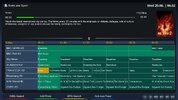
I have openatv in one of my slots on my gigablue, the autobouquets maker is under, menu, setup, tuner,scanning and recepeption. I ran this and installed a skin i like and the epg seems to populate automatically.
 

Attachments

  • epg.jpg
    epg.jpg
    236.6 KB · Views: 157
I wonder have I got my terms mixed up, by Xtream I mean XE editor where you get a code onscreen for iptv. Is it possible Xtream is different? Maybe openatv later versions are easier will have a look later on today if I get free.

kegnkiwi what version of openatv and that skin looks nice would like to try. For epg it should show under settings, maybe openepg or such.
 
I wonder have I got my terms mixed up, by Xtream I mean XE editor where you get a code onscreen for iptv. Is it possible Xtream is different? Maybe openatv later versions are easier will have a look later on today if I get free.

kegnkiwi what version of openatv and that skin looks nice would like to try. For epg it should show under settings, maybe openepg or such.
The skin is algare (not sure on spelling). I just downloaded the ipk from ls forum. The openatv version is 7.6. I know you can mode the skin with lots of options but for me this stock skin is really nice and in fact the screen shot is not as nice as it is on screen.
 
Last edited:
Synopsis (What program is on a channel) = EPG

Groups of channels = Bouquets

For Xtreme editor, you have to install the version that corresponds to the python version in your image. The install commands are in the thread specific to the plugin.
 
I wonder have I got my terms mixed up, by Xtream I mean XE editor where you get a code onscreen for iptv. Is it possible Xtream is different? Maybe openatv later versions are easier will have a look later on today if I get free.

kegnkiwi what version of openatv and that skin looks nice would like to try. For epg it should show under settings, maybe openepg or such.
Yes, XE Editor . It's called Xtream Editor and also known as XEAIO in certain circles.
 
I have openatv in one of my slots on my gigablue, the autobouquets maker is under, menu, setup, tuner,scanning and recepeption. I ran this and installed a skin i like and the epg seems to populate automatically.
Is that for IPTV or satellite? I'm wanting a satellite bouquet as I can't record from IPTV. With the sat feed, I can set timers for recordings. Ok, so the channels are limited but hey-ho.
 
Is that for IPTV or satellite? I'm wanting a satellite bouquet as I can't record from IPTV. With the sat feed, I can set timers for recordings. Ok, so the channels are limited but hey-ho.
When i set up a new image i start off my installing a euro channel list from creif. Then i install a bouquet as shown above. So when i press the ok button on my remote and blue button all the 28.2e channels are listed in channel type. I also have options of all sats and channels on 28.2 that open with icam.
 
goodoldbakes can you tell me the name and model of the receiver you are using? I may have same receiver so easier to look at and explain.

i'm using uno4kse for the below.

But for openatv to get you sorted, I'll find that link for XE and Vix later. Do this

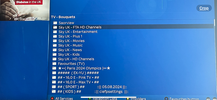
1. MENU SETUP RECEPTION, and below MANUAL SCAN it may show AUTOBOUQUETMAKER, if not you exit out and go to plugins and dowload and then find autbouquetmaker in system plugins and install it. Once installed you have to configure to your needs , on page one under comfigure its NO, NO, YES, NO, none, top, yes, NO. NB Green to save.

2. for providers you want SKY UK yes and regions I use London SD csutom, you get more channels, ftaonly, yes, next bit is up to you, I have yes yes yes. swap cahnels is important, green,
3. go to hide sections and hide crap you dont want to appear, shopping, religion etc green
4. keep kust put a tick on all the ones you want to keep. green
5. start scan

6. now check exit out OK arrow up blue, NB you may have to do this twice at first. You should see your bouquets. See pic I done and just ignore bits below favourites that does not apply to you.

Do that and I'll do epg later
 

Attachments

  • IMG_8926.PNG
    IMG_8926.PNG
    347 KB · Views: 139
Last edited:
For the epg this is what I have and it works.
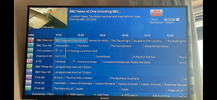
1. MENU, SETUP EPG and it may show CrossEPG at top if not exit out and download via plugins from system plugins. NB when it installs it may crash box and it will appear, if it does not crash and does not appear do a reboot. Once you see it configure as follows. storage make sure its not internal flash, i have it on HDD.

2. OPENTV PROVIDERS, OK, OK and a tick will appear, green.

3. ZMLTV, OK I have ticks against UK/IRELAND Freesat, FTA, INTERNATIONAL, SKY 1, SKY 2, SPORTS MOVIES. green.
4. NOW yELLOW TO DOWNLOAD you should get . see pic. I'm using slyk skin.
 

Attachments

  • IMG_8924.PNG
    IMG_8924.PNG
    343.9 KB · Views: 137
Last edited:
Is that for IPTV or satellite? I'm wanting a satellite bouquet as I can't record from IPTV. With the sat feed, I can set timers for recordings. Ok, so the channels are limited but hey-ho.
hey-ho :smiley: you would be better letting members know what device you have as for epg if just on 28.e you do not even need epgimporter or cross epg as you setup main epg settings it pulls it from satellite when you select a channel then it will populate , but you will need epgimporter for iptv epg, As for Vix or openatv that is a personal choice, if you have a multibootdevice then you can try both as for XE it seems to cause more bother everytime python updatesif you actually have your xtream codes details try bouquetsmakerxtream.
 
goodoldbakes can you tell me the name and model of the receiver you are using? I may have same receiver so easier to look at and explain.

i'm using uno4kse for the below.

But for openatv to get you sorted, I'll find that link for XE and Vix later. Do this

1. MENU SETUP RECEPTION, and below MANUAL SCAN it may show AUTOBOUQUETMAKER, if not you exit out and go to plugins and dowload and then find autbouquetmaker in system plugins and install it. Once installed you have to configure to your needs , on page one under comfigure its NO, NO, YES, NO, none, top, yes, NO. NB Green to save.

2. for providers you want SKY UK yes and regions I use London SD csutom, you get more channels, ftaonly, yes, next bit is up to you, I have yes yes yes. swap cahnels is important, green,
3. go to hide sections and hide crap you dont want to appear, shopping, religion etc green
4. keep kust put a tick on all the ones you want to keep. green
5. start scan

6. now check exit out OK arrow up blue, NB you may have to do this twice at first. You should see your bouquets. See pic I done and just ignore bits below favourites that does not apply to you.

Do that and I'll do epg later
Thanks for taking the time to document all of this. Appreciate it. I'll give everything a go tomorrow, when I get a bit of time and report back.

I'm running an Octagon SF8008 box, both sat outputs linked to my old Sly dish. Obviously running IPTV on it also, but that's fine.

One thing I don't like about ATV, is the 3 or 4 second delay between changing IPTV channels. What's all that about?
 
goodoldbakes can you tell me the name and model of the receiver you are using? I may have same receiver so easier to look at and explain.

i'm using uno4kse for the below.

But for openatv to get you sorted, I'll find that link for XE and Vix later. Do this

1. MENU SETUP RECEPTION, and below MANUAL SCAN it may show AUTOBOUQUETMAKER, if not you exit out and go to plugins and dowload and then find autbouquetmaker in system plugins and install it. Once installed you have to configure to your needs , on page one under comfigure its NO, NO, YES, NO, none, top, yes, NO. NB Green to save.

2. for providers you want SKY UK yes and regions I use London SD csutom, you get more channels, ftaonly, yes, next bit is up to you, I have yes yes yes. swap cahnels is important, green,
3. go to hide sections and hide crap you dont want to appear, shopping, religion etc green
4. keep kust put a tick on all the ones you want to keep. green
5. start scan

6. now check exit out OK arrow up blue, NB you may have to do this twice at first. You should see your bouquets. See pic I done and just ignore bits below favourites that does not apply to you.

Do that and I'll do epg later
Thank you, that's worked perfectly. Exactly what I was after. Much Appreciated.
 
Back
Top