Openatv movie list not showing .vod file extensions

maldred

Newbie
I have a weird issue with video files with the .vod extension not being shown in the movie list.

If I rename them to .MP4 they show up and can be played no problem.

I presume this is just a codec issue but wondered if anyone had any way to make them show without having to go through and rename every file.

I am on openatv 7.6 beta but this was an issue with previous versions 6.2 and 6.4. box is a H9 combo

Thanks
 
It's not a codec issue, it's a file type recognition issue and can be easily changed. How are you downloading the files?
 
Thanks, they come from xstreamity.

HAd a look through all the settings but it's not something I can see in there.
 
The code in Enigma2 will need to be adapted so that it lists .vod or change Xstreamity to save as a different file type.
 
Thanks, they come from xstreamity.

HAd a look through all the settings but it's not something I can see in there.
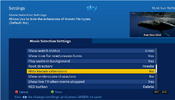
Are you certain in in movie selection settings you do not have hide file extensions set to yes

Capture.PNG

Because in within xtreamity there is no way to rename files they are just downloaded as named by provider i,e, normaly mkv or mp4

or try clean install on another slot and do not restore settings to see if that sorts problem.
 
Are you certain in in movie selection settings you do not have hide file extensions set to yes

View attachment 127187

Because in within xtreamity there is no way to rename files they are just downloaded as named by provider i,e, normaly mkv or mp4

or try clean install on another slot and do not restore settings to see if that sorts problem.
Definitely set to no.

All vod files are downloaded with .vod extension. If I go into file commander on the box I can see them all. Rename and they show in movie list. Think provider has changed as they used to be .MP4 files

I guess openatv doesn't have support the .vod files.

Thanks for your input.
 
Definitely set to no.

All vod files are downloaded with .vod extension. If I go into file commander on the box I can see them all. Rename and they show in movie list. Think provider has changed as they used to be .MP4 files

I guess openatv doesn't have support the .vod files.

Thanks for your input.
there is no such filetype as .vod in xstreamity if you highlight movie the filetype is shown
So like you say I think provider error

Capture.PNG

and file saved as
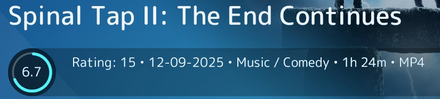
EN-Spinal-Tap-II-The-End-Continues.mp4

But you said you have had this also with older openatv versions so I take it you have always had same provider.

Edit when downloading have a look at /etc/enigma2/xstreamity folder downloads2.json file and you will see file extension.
 
Last edited:
You are wasting your time looking at setting options that do not exist. Issue the following command and upload the mylist.txt file which will be created in your /tmp directory. It will list all the files in there. I am presuming you are downloading to /media/hdd/movie Feel free to PM if you don't want to respond openly.

ls -la /media/hdd/movie >/tmp/mylist.txt

I checked my downloads, they are saved as .mp4 and .mkv too. So the file type is specific to your provider. Can you also transfer a downloaded .vod file to your PC and check the properties in vlc. Post a screenshot please.
 
Last edited:
My provider is obviously using .vod extensions
 

Attachments

  • IMG_20251019_184119_HDR.jpg
    IMG_20251019_184119_HDR.jpg
    1 MB · Views: 127
Your screenshot is not helpful. Please respond with the requested details/file so we can requesting adding workarounds for your provider.
 
apologies, my reply was mainly to urie's own screenshot.

attach mylist.txt the .mp4 files are ones i have renamed and show in the movie list.
 

Attachments

Just to double check what you said on first post, if you rename to mp4, does enigma2 play them? Sorry for specifics, but "play" is not same as "show".
 
Navigate to the following plugin location on your receiver /usr/lib/enigma2/python/Plugins/Extensions/XStreamity

Rename the following file/s by adding a .bak at end of the file name
vod.py
vod.pyc

Please download the .py file in link below and transfer to the above mentioned plugin location and restart
https://raw.githubusercontent.com/AbuBaniaz/XStreamity/refs/heads/vod_rename/XStreamity/usr/lib/enigma2/python/Plugins/Extensions/XStreamity/vod.py

After restart, access the plugin and download a file and check again. Please delete the vod.py after it compiles the vod.pyc file
 
Thanks, so it looks like all VOD are now MP4 which is brilliant.

Can the same be applied to TV series do you know?

Many thanks
Sorry you seem to be confusing things here from your list posted it was only series files that were named as .vod
your movie files were mp4 so have you manually renamed them.

But I think developer had made changes before seeing your list. going by info you had mentioned to @Abu Baniaz at the time.
Have you not spoken to provider because this is not a common problem you are only one I have heard of with this problem.
 
Please delete the .py file you transferred to the receiver and then install version XStreamity v5.16_20251020

The list of files you provided revealed it was movies and series. He has made the changes for both types.
 
Back
Top