Guide Slimbox Rom Install on a Transpeed X8 using PhoenixCARD SD Card preparation.

Ferret.

Administrator
Staff member
First we need to prepare the SD Card with PheonixCard. To flash the Allwinner Android Box.

PhoenixCard​


MicroSD card flashing tool usd to flash images generated using Allwinner Technology's source code. The tool creates bootable microSD cards and NAND flashing microSD cards.
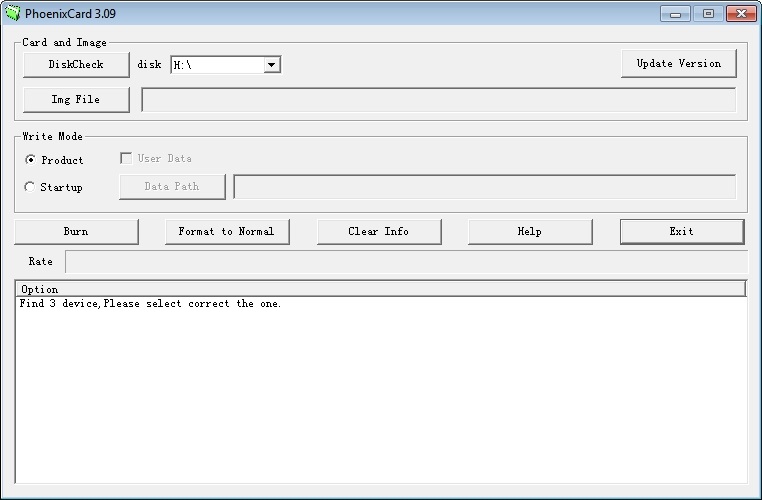


Screenshot-PhoenixCard-Main


Instructions:

CAUTION!! This tool can reimage (erase) a drive if used incorrectly. Verify the drive being flashed and

as a precaution, remove any unnessecary USB drives prior to the burn process.


1 - Launch App and select the firmware to flash to the microSD card.

2 - Select the write mode, Product creates microSD card that flashes image to module NAND and Startup creates a bootable microSD card.

3 - Insert USB/MicroSD adapter and verify USB/MicroSD adapter matches the drive letter selected in PhoenixCard.

4 - Select burn once ready to create the MicroSD card.
 

Attachments

never normally have issues flashing devices, but for the love of me can't get it done.

installed suite plugged in via usb and unknown device detetced updated drivers , but device not attached when i run suite/.

tried the sd card method and fails to burn image. used sd formator , the image i used was sbx_transpeed_h618_atv_12_11 not the mmy one. either way the burnimg process fails

fail.png
 
Last edited:
never normally have issues flashing devices, but for the love of me can't get it done.

installed suite plugged in via usb and unknown device detetced updated drivers , but device not attached when i run suite/.

tried the sd card method and fails to burn image.
Make sure reset button on box is pressed in before you connect to usb then wait 5 seconds after connected and release.
Have you tried different usb port on the box?
 
Make sure reset button on box is pressed in before you connect to usb then wait 5 seconds after connected and release.
Have you tried different usb port on the box?
tried both usb slots, the reset button i cant see or feel , have press a small screwdriver into the av hole as per but deffo no reset button
 
Last edited:
never normally have issues flashing devices, but for the love of me can't get it done.

installed suite plugged in via usb and unknown device detetced updated drivers , but device not attached when i run suite/.

tried the sd card method and fails to burn image.
@Ferret. Can probably help.
 
tried both usb slots, the reset button i cant see or feel , have press a small screwdriver into the av hole as per but deffo no reset button
Its i micro sd method i used, but found you need to use 2gb card to do it. A 32gb would not work.

Also use SD card formatter to format the card before making it with overwrite formatting and CHS selected.
 
tried both usb slots, the reset button i cant see or feel , have press a small screwdriver into the av hole as per but deffo no reset button
Ive added the SD formatter and the latest Pheonix card to the guide

 
never normally have issues flashing devices, but for the love of me can't get it done.

installed suite plugged in via usb and unknown device detetced updated drivers , but device not attached when i run suite/.

tried the sd card method and fails to burn image. used sd formator , the image i used was sbx_transpeed_h618_atv_12_11 not the mmy one. either way the burnimg process fails

View attachment 129024
The mmy version is the one i used

Difference between the 2 is what memory the box has.
 
flashed the sd card finally. went to put it in the slot and it slipped all the way in , now its rattlimg around , jesus christ off to bed before the cricket starts


Find another SD card or try taking it apart
 
flashed the sd card finally. went to put it in the slot and it slipped all the way in , now its rattlimg around , jesus christ off to bed before the cricket starts


Find another SD card or try taking it apart
Ive stripped mine to see what was inside.

If you take a knife with a fine cutting edge, from the top of the box place the knife in the top notch and lever all the way around that top edge. Dont be shy to give it some you'll break nothing.
 
I'm intrigued, what is the benefit and where can I buy one? You have great patience and of course ferret.
 
When it's flashing how many times does it do the green bar , do you have to eject the SD card quick . Or pull the power Otherwise it will just keep refreshing.
1000026937.jpg
 
When it's flashing how many times does it do the green bar , do you have to eject the SD card quick . Or pull the power Otherwise it will just keep refreshing.
View attachment 129058
Allow it to go to full then the screen goes black for a second.

Pull the power then and remove the sd card and power on.

At that point you'll setup and then need to remove the Russian app pre-installed.
 
Can this be used to flash a T95 android box?

Specifications:

-Chipset: Allwinner H616 Quad-core Cortex A53

-GPU: Penta-Core G31 MP2

It's not booting up, not sure if psu has failed...
 
Only model i see supported on that cpu and chipset is the HD Box Z10 pro.

Will be a different boot loader so i doubt it will flash.

PSU is the first stop as you say.
 
Back
Top