Tivimate question

superfan

Member
It's probably more an issue with my new box than the tivimate app but maybe someone has come across this issue before.
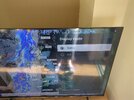
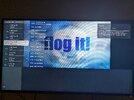
A lot of the time now when I open up tivimate the picture doesn't fill the full screen, only the top half.
Is there any settings I can go in to to stop this from happening?
 
Tivimate doesn’t really have any display settings other than AFR and resolution matching.
You could try clear epg as the data can build up.
Also force close and clear cache occasionally.
 
Like this
 

Attachments

  • IMG_20251125_105728_983.jpg
    IMG_20251125_105728_983.jpg
    1.1 MB · Views: 187
It's a brand new (homatics) box, I think it's more the issue with that than the app to be honest.
I've used tivimate on loads of different devices (formuler, Nvidia, fire devices) in the past and never had this issue
 
Last edited:
It's a strange one, this is what it looks like a lot of the time.
 

Attachments

  • PXL_20251125_173624197.jpg
    PXL_20251125_173624197.jpg
    3.2 MB · Views: 143
It's a strange one, this is what it looks like a lot of the time.
Yeah that is a glitch and nothing to do with the aspect ratio settings.
If you want aspect ratio settings, when in full screen mode press menu and scroll along to icon highlighted in blue and select.

IMG_7431.jpeg
 
Last edited:
Back
Top