Which box should I use

lynchp333

Newbie
Questions to room.
I have android box a mk box a mxq box all gathering dust and I'm using a zgemma H2s at the moment. . Aa cam lines seem to be dieing off which of my box's should I be using for iptv .
I like the epg an ability to record on H2s. ?

Sent from my SM-G900F using Tapatalk
 
Android box can run iptv well , zgemma and mag boxes too
But honestly recording on iptv is a little of a hard one as server owners don't allow it

Sent from my K10000 using Tapatalk
 
if you still have satellite capability then use h2s as at least you can record what's left of cardsharing and the FTA HD & SD channels.
 
I have a zegmma h2s, aftv box with smart iptv app, and Samsung tv with the app on
anybody had any experience with any of those for iptv, or is to better to take the plunge and get a mag box.
never had iptv before so not to sure which way to go.
 
I have a zegmma h2s, aftv box with smart iptv app, and Samsung tv with the app on
anybody had any experience with any of those for iptv, or is to better to take the plunge and get a mag box.
never had iptv before so not to sure which way to go.
Zgemma and smart tv are really good mate get a test and try it out
For the smart tv please check your plugins and see if you have smart iptv there
For zgemma you don't need an app , the iptv sub can be integrated into your list ;)

Sent from my K10000 using Tapatalk
 
Zgemma and smart tv are really good mate get a test and try it out
For the smart tv please check your plugins and see if you have smart iptv there
For zgemma you don't need an app , the iptv sub can be integrated into your list ;)

Sent from my K10000 using Tapatalk
thanks going to try a test early next week. in work all weekend so cant mess about.
I have that app on my tv , but was scared it wouldn't be powerful enough to get a good experiance
 
I have a zegmma h2s, aftv box with smart iptv app, and Samsung tv with the app on
anybody had any experience with any of those for iptv, or is to better to take the plunge and get a mag box.
never had iptv before so not to sure which way to go.
I'm using smart Iptv app on LG smart TV really easy to set up. The app is a free trial for about a week I think and then you have to buy it but it's only about 4 or 5 quid. Make sure you use an Ethernet lead from modem to TV (don't connect wirelessly). If you need any help pm me.
 
I'm using smart Iptv app on LG smart TV really easy to set up. The app is a free trial for about a week I think and then you have to buy it but it's only about 4 or 5 quid. Make sure you use an Ethernet lead from modem to TV (don't connect wirelessly). If you need any help pm me.
thanks will give it a go as soon as I get a provider
 
I have a zegmma h2s, aftv box with smart iptv app, and Samsung tv with the app on
anybody had any experience with any of those for iptv, or is to better to take the plunge and get a mag box.
never had iptv before so not to sure which way to go.
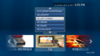
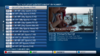
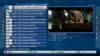
hi mate if you have aftv box then install StbEmu on to it you will get same look as mag box and runs very well, runs well on the stick to
 

Attachments

  • StbEmu.png
    StbEmu.png
    623.3 KB · Views: 135
  • StbEmu3.png
    StbEmu3.png
    950.3 KB · Views: 131
  • StbEmu2.png
    StbEmu2.png
    862.1 KB · Views: 129
I have a zgemma star 2s at the moment but let oking at other options

I haven't got a smart TVs but I'm running IPTV on my zgemma
 
that looks great that is it hard to set up . put the iptv sub in?
download from here
https://stbemu-pro.en.aptoide.com/
you have to get file over to box if you have box place it on usb then download es file explorer on box then use that and locate stick and install it from there

if using stick then you will need a app like adblink to push file/install file from computer or use apps2fire from phone (what i use)

p.s remember to do this before trying to install file
  • Put your Fire Stick in your TV. Go to Settings | System | Developer Options.
  • Switch On both Apps From Unknown Sources and ADB Debugging.
once done all you need now is mag url from supplier and send him you mac code that you will find in stb config on app
 
Back
Top