Hi, I saved all my info on the pc hoping to just transfer them back. I expected to see 'newcamd.list' but there isn't one on the new build, i've tried transferring via usb but it wont even recognise the usb pen. can I add them to the CCcam.cfg file via file zilla?http://www.techkings.org/threads/wooshbuild-v5-support-thread.109525/
Post 3 spoiler 4 you can download the files you need whether it be newcamd or ccam
Paste your details in and save
Then either put the file on usb and use the cam importer. Or using file explorer on your computer, put the file on your hdd then run the cam importer.
You said you had re-done wooshbuild did you backup your settings? Did you then go back into wb config and restore your settings. As this should also bring your line back
You are using an out of date browser. It may not display this or other websites correctly.
You should upgrade or use an alternative browser.
You should upgrade or use an alternative browser.
Online flashing of zgemma-star H.2S (from Whoosh 5 to Whoosh 6)
- Thread starter aphuk
- Start date

ive tried that (created a new file) added the lines and no joy. for some reason i dont get the channels i used to, i dont even get ITV HD channels, frustrating. do i need to do anything with the Softcam? I prefered the older wooshbuild, you could see into files to see if they are correctJust put your newcamd.list file in usr/keys

pabloescaban
VIP Member
in softcam panel, highlight the softcam mgcam1.38 and click green button to restart the softcam, may need restart box afterwards

pabloescaban
VIP Member
it needs to be saved as ALL FILES so that when it's closed it doesn't look like a notepad icon, see here:
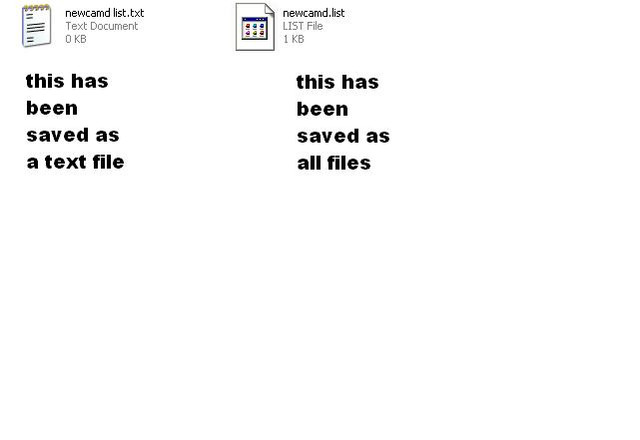
Do you have mg_cfg file in usr/keys
https://mega.nz/#!zEsEQAzK!HQ-po9M9nXtQAaZqGYchtouptTF98t3I0KmwX6QvV9M
https://mega.nz/#!zEsEQAzK!HQ-po9M9nXtQAaZqGYchtouptTF98t3I0KmwX6QvV9M

It is a Zgemma Star H5.2S Twin Tuner. The pic I posted is taken from the actual box which tells me that there is a bug in the interface that is not reading the correct model of the box but for sure it is a Zgemma Star H5.2S Twin Tuner ......I might be wrong (usually am) but looking at the pic on the first post. Its saying its an h5, so why the h2s download.
It is a Zgemma Star H5.2S Twin Tuner. The pic I posted is taken from the actual box which tells me that there is a bug in the interface that is not reading the correct model of the box but for sure it is a Zgemma Star H5.2S Twin Tuner ......Well spotted @makido , in the words of Captain Mainwaring, " I wondered who'd be the first to spot that". :👍::)
See my question above about the folder and file structure which came out of the BaseBuild-v2-wooshbuild-H2S RAR file I downloaded for version 6. All attempts so far have been made using a FAT32 stik in the rear port but the only difference has been what I copied on the stik before I restarted the boxsounds like it's not flashing, try putting usb stick in front usb port. LED on front should change from Boot to FLSH for a few minutes and then boot again before countiing up
ATTEMPT 01 used;
zgemma (folder)
misc-files (folder)
ATTEMPT 02 used;
only the 4 files from zgemma folder which I put on the root of the stik (as extracted from BaseBuild-v2-wooshbuild-H2S)
force
imageversion
kernel.bin
rootfs.bin
Last edited by a moderator:

WBconfig only provides for direct flash of Whoosh 5.003Is it the h5.2s download you have then and not the h2s.
Have you tried updating via wb config might be easier
Just spotted the subtle diff' on http://wooshbuild.co.uk/downloads.phpThe folder inside the zgemma folder needs to be named h5 to flash a h5 box.
If it's named anything else you have the wrong flash file.
I downloaded Zgemma HS, H2S - WB v6
should have downloaded
Zgemma H5-2S - WB v6 !!!
Leave the key questions "Which USB port on the zgemma" to use (Front or rear) and also once I unzip the RAR what psactly do I put on the USB stick. The whole structure (folders & files) or just the files found in the H5 folder ?
Ahah !! I see that now. My absolute mistake Aaaargh!!! tyvm makido. Will crack on and start again.3rd one down on the wooshbuild site is the h5.2s
Last edited by a moderator:

Sparkrite
TK Veteran
You seem to getting somewhat hot and bothered and going around in circles with this.
Why not take a step back and do a bit of reading first, Very good FAQ on the first page here :-
http://www.techkings.org/threads/wooshbuild-v5-support-thread.109525/
Also @FoxMan 's excellent user guide here :-
https://www.dropbox.com/s/lqma7vb3wcrytvx/Basic User Guide v6.pdf?dl=0
Why not take a step back and do a bit of reading first, Very good FAQ on the first page here :-
http://www.techkings.org/threads/wooshbuild-v5-support-thread.109525/
Also @FoxMan 's excellent user guide here :-
https://www.dropbox.com/s/lqma7vb3wcrytvx/Basic User Guide v6.pdf?dl=0