Satellite E2m3u2Bouquet With zgemma h7s and Openvix 6.8

dech1969

Newbie
Hi there
Looking for some help. I recently upgraded to Openvix 6.8 from 6.7 ver 20 on this upgrade I lost all access to the plugin E2m3u2Bouquet which is the IPTV M3U bouquet maker.
It work seamlessly up to now and it’s gone off the plug in list after the 6.8 upgrade. I tried to copy the plug in using FTP but there’s a magic error and the plug in is just not displaying in the plug in. it’s something to do with a python upgrade I think. My Iptv bouquet and epg worked great with this plugin and I am thinking of downgrading back to 6.7 is I cannot get a fix. I’m using a zgemma h7s box. I would appreciate any help or if there’s a new plug in that can generate m3u bouquet along with using a suppliers epg url. Thanks in advance
 
You can try xstreamity or m3uiptv

Openvix 6.8, ATV 7.6, OBH 5.6 and other images using OE-A 5.6 branch uses python version 3.13.9. Any plugins built for older python versions will give a bad magic number. Unless the .py files are included.
 
Last edited:
Thank you Abu I will try that unfortunately they don’t work anything like the old plugin. The Iptv bouquet maker had 2 functions 1 download and generate bouquet from the m3u list and secondly download of the epg onto those generated bouquets. I am hoping that they will upgrade the plugin to comply with the new python
 
Last edited:
Did you keep a backup and go back to 6.7?
I did, I was lucky that I done a full image backup before the upgrade so I have just re imaged 6.7 ver 20 and the plug in is back. My only problem is that I will have to upgrade eventually so I am hoping that this plug in will be made compatible as it’s really good. My h7s zgemma has saorview (Irish) channels I’m using a ps3 tuner so that I can record everything as it made the box into a twin tuner for a roof aerial . I also have all the FTA on sat twin tuners. And finally all the Iptv are also accessible on the menus with full bouquets and EPG thanks to the plug in. Everything was working perfectly. Until I upgraded to 6.8 and I lost the plugin which is a disaster. Thank you for you input
 
The zgemma H7S has 4 partitions so you can always keep 6.7 in one partition and update to 6.8 on another or use different images but there is an old saying " If it aint broke dont fix it" . 6.7 will last a long time yet.
 
The zgemma H7S has 4 partitions so you can always keep 6.7 in one partition and update to 6.8 on another or use different images but there is an old saying " If it aint broke dont fix it" . 6.7 will last a long time yet.
Thanks for your advice, I certainly will stick with the 6.7. The other thing I found out when going through all this is that although you can flash an image onto any of the slots the multi boot image selector on the open vix does not work. Nothing happens so the extra slots are pretty useless to me at the moment. Of course if you want to flash an image you will get a choice of a slot, but I just can’t power down the box and select an image of my choice on open vix. I’m used of that image that’s why I didn’t experiment with the other platforms. But going back to the core issue I will stay with 6.7 for now and will keep an eye out for any suggestions as I’m sure other people will be affected by this
 
You have me a bit confused when you say you can flash an image to a slot and then cant select it. When box is powered on it will boot to last used image and it is within that image you choose multiboot either as willo says above or if you hold down the power button a menu will pop up and you can then select an image. I always use the PIP mode.
 
Thanks yes the box always boots to the last image however I am unaware of how to use the other images or how to access them. I can see you mention pip mode? What’s that.
I use Openvix with blue hd skin, there is an option on the standby and reboot screen for multi boot image selector but when I select it nothing happens so I don’t get any options to select a different image. Where I’m confusing you is that if I got to image manager and want to reinstall an image the box does ask which slot to I want to flash to.
 
Thanks yes the box always boots to the last image however I am unaware of how to use the other images or how to access them. I can see you mention pip mode? What’s that.
I use Openvix with blue hd skin, there is an option on the standby and reboot screen for multi boot image selector but when I select it nothing happens so I don’t get any options to select a different image. Where I’m confusing you is that if I got to image manager and want to reinstall an image the box does ask which slot to I want to flash to.
PIP is Picture in Picture.

If nothing happens when using multiboot image selector i assume you have never flashed any images to the other slots ? Is that the case ?
 
Aha I bet you have not flashed to the other slots!! Hence no choice. When you flash H7S initially using USB you then should flash thereafter via image manager and not use usb method.
 
Thanks yes initially I flashed with the usb but now everything updates online with software updates. I do have images on other slots example 6.6, 6.7 last images and now 6.8 but when I select multi boot image selector nothing happens. I just thought it might be a limitation of Openvix. Therefore I just thought the slots were were for holding older images but always found it strange that I could never boot into any of them, just whatever the current one is in other words deep standby and reboot
 
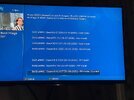
How do you know you have images on other slots? This is what I get via holding power button, 4 is over the page in photo. Green to reboot, although I think OK does same. But that Blue HD skin is ancient and has bits missing. If you feel comfortable change skin to simple ten eighty and see if slots appear, if not go menu setup vix then image manager. I use a kiddac skin with sly q layout.

I tried software updates just now and it sends me to image manager via buttons, as I said Blue HD very old.
 

Attachments

  • IMG_9280.jpeg
    IMG_9280.jpeg
    335 KB · Views: 179
I just see it hat they are stored on the different slot. Slot 4 is empty.
Thanks for pos
How do you know you have images on other slots? This is what I get via holding power button, 4 is over the page in photo. Green to reboot, although I think OK does same. But that Blue HD skin is ancient and has bits missing. If you feel comfortable change skin to simple ten eighty and see if slots appear, if not go menu setup vix then image manager. I use a kiddac skin with sly q layout.

I tried software updates just now and it sends me to image manager via buttons, as I said Blue HD very old.
imjustbsee them on the various slots. Slot 4 is empty on my box but I have 6.7 ver 20 on slot 1 and Openvix 6.8 on slot 2. Etc.. thanks for posting the image i reckon I’m away beehind with the skin that I am using I’m using BLUE HD but you seem to be using another skin where maybe I would get more options I will try using your skin Thanks for your help
 
I just see it hat they are stored on the different slot. Slot 4 is empty.
Thanks for pos

imjustbsee them on the various slots. Slot 4 is empty on my box but I have 6.7 ver 20 on slot 1 and Openvix 6.8 on slot 2. Etc.. thanks for posting the image i reckon I’m away beehind with the skin that I am using I’m using BLUE HD but you seem to be using another skin where maybe I would get more options would you mind sharing which skin you are using? Thanks for your help

That skin has not been updated for a few years, that is why it is not showing the options.
Abu is there a skin available that will give me all the up to date options but still bares the resemblance of the sly layout. Yes I have used BLUE HD since day 1 back in in the zgemma star times. Definitely time for a skin upgrade. It may also resolve some of the other issues I’m having with the m3u Iptv bouquet generator or maybe not . at least if I have something current I could see what options I have. Thank you again!
 
Try one of Kiddac's skins. They are on the plugin server.

Changing skin won't solve the plugin issue. You are better off contacting the plugin author and ask for a version compatible with ATV 7.6. ATV build for more receivers, so you will likely get a better response instead of saying Vix.
 
Try one of Kiddac's skins. They are on the plugin server.

Changing skin won't solve the plugin issue. You are better off contacting the plugin author and ask for a version compatible with ATV 7.6. ATV build for more receivers, so you will likely get a better response instead of saying Vix.
Than you so much
 
Back
Top