Firestick alternatives

It could be trying to update itself at night and the update causes the crashing. By switching off at night you are stopping the update.
Power the stick from the Tv usb port it will not update as power source is to low.

Its fine to run the stick daily but please please do not try and update the stick while its powered from the Tv usb port or it can brick it.

Its a simple solution to stop amazon messing around with your device and blocking third party apps.
 
Power the stick from the Tv usb port it will not update as power source is to low.

Its fine to run the stick daily but please please do not try and update the stick while its powered from the Tv usb port or it can brick it.

Its a simple solution to stop amazon messing around with your device and blocking third party apps.
My Samsung updates ok using tv usb.
 
An example if anyone wants to check before using it. I take no responsibility if people update their devices, I have said not to do this via usb power source.

My samsung Tv you can find the USB power output at the rear or in the manual.

This will stop the stick from updating and removing third party apps
IMG_20260303_170916.jpg
IMG_20260303_171411.jpg
 
Last edited:
I've just got into the habit or holding down select and play to restart it as soon as I use it now, still irritates me that its required for what is supposed to be the top of the line product
It’s basically the OS and the Amazon background process’s running and hogging resources.
Most devices will run better from power cycle and a fresh start.
 
It’s basically the OS and the Amazon background process’s running and hogging resources.
Most devices will run better from power cycle and a fresh start.
Totally correct. The difference using a proper android device you can set the maximum amount of apps to run in the background.
 
I have the Fire cube which i have a smart plug connected to it, to turn off at the socket, as i explained in my other post , getting freezing on screen, and when watching live channels the program would skip, like your watching a game on footy, ball going towards net, then next thing the players are running up the pitch, so someone scoring a goal would jump forward..
tried my iptv on another fire stick all worked fine, so thought it was the fire cube.
All working fine the last few weeks until the last few days, 'i watch something on VOD, then when fished the movie go to watch something on live tv, picture come on but freeze, try another channel the same thing, picture would move a split second and freeze and would do the same with all live channels, and only way to clear it was rebooting fire cube, the all working fine.

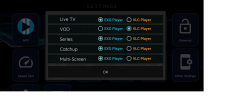
So i changed the IPTV player in settings, from exo player to vlc player for live tv 'and left the rest on exco player', no more freezing or program skip jumping.
All good.

But last night after watching a movie VOD , i switched over to live channels , but no sound on any of them, go back to a VOD play a movie sound all ok, go back to live channels no sound, have to reboot for it to sort itself out.
Cant see any settings for sound change. Using XCIPTV
 
I have the Fire cube which i have a smart plug connected to it, to turn off at the socket, as i explained in my other post , getting freezing on screen, and when watching live channels the program would skip, like your watching a game on footy, ball going towards net, then next thing the players are running up the pitch, so someone scoring a goal would jump forward..
tried my iptv on another fire stick all worked fine, so thought it was the fire cube.
All working fine the last few weeks until the last few days, 'i watch something on VOD, then when fished the movie go to watch something on live tv, picture come on but freeze, try another channel the same thing, picture would move a split second and freeze and would do the same with all live channels, and only way to clear it was rebooting fire cube, the all working fine.

So i changed the IPTV player in settings, from exo player to vlc player for live tv 'and left the rest on exco player', no more freezing or program skip jumping.
All good.

But last night after watching a movie VOD , i switched over to live channels , but no sound on any of them, go back to a VOD play a movie sound all ok, go back to live channels no sound, have to reboot for it to sort itself out.
Cant see any settings for sound change. Using XCIPTV
Try another app could be codec issue. Exo player should be fine see if your supplier dose tivimate if they insist you use there apps or get a test from another supplier to rule out supplier issues
 
I have the Fire cube which i have a smart plug connected to it, to turn off at the socket, as i explained in my other post , getting freezing on screen, and when watching live channels the program would skip, like your watching a game on footy, ball going towards net, then next thing the players are running up the pitch, so someone scoring a goal would jump forward..
tried my iptv on another fire stick all worked fine, so thought it was the fire cube.
All working fine the last few weeks until the last few days, 'i watch something on VOD, then when fished the movie go to watch something on live tv, picture come on but freeze, try another channel the same thing, picture would move a split second and freeze and would do the same with all live channels, and only way to clear it was rebooting fire cube, the all working fine.

So i changed the IPTV player in settings, from exo player to vlc player for live tv 'and left the rest on exco player', no more freezing or program skip jumping.
All good.

But last night after watching a movie VOD , i switched over to live channels , but no sound on any of them, go back to a VOD play a movie sound all ok, go back to live channels no sound, have to reboot for it to sort itself out.
Cant see any settings for sound change. Using XCIPTV
I have to reset my firecube daily, if I don't UHD via now TV is glitchy and stuttery, as soon as I restart it perfect. Not a firecube fan personally, but annoyingly for Now TV in UHD, I'm stuck for choices, although I like my glow in the dark remote so I'll persist!
 
The built in players should do the job for live TV and VOD however have noticed over the years smarters can have problems with VOD
 
Changed some settings in XCIPTV, supplier suggested, be working ok last 5 days.
Noticed FilmPlus got blocked on my firecube
What android box would be near same specs as my firecube, that has passthrough as use my amp for sound out
Thinking maybe near future getting rid of firecube .

Thanks
 
Be good if you told us the settings so other people can fix any issues.
Did have player for live TV set to VLC player, but he recommended to use EXO player for all, apart from VOD leave on VLC player
6 days so far no problems, so hoping its sorted or sell my cube and get a android box.
 
Exo player is the built in player on XCIPTV and the default settings usually and should not be touched.

This should be the case for most apps except smarters for VOD and TV shows use VLC or MX player
 
Exo player is the built in player on XCIPTV and the default settings usually and should not be touched.

This should be the case for most apps except smarters for VOD and TV shows use VLC or MX player
It seems to of stop the problems i was having using VLC, never had problems before in last few year, just lately.
 
Back
Top