Windows 10 Longer loading and shutting down issues.

i myself did image windows onto my 4TB NVMe M.2
kept my image backup just in case , running WIN 10 64Bit extended my EOL as i do not want/need Win 11 .
All my logins and passwrds were all saved i had to log into my Microsoft Acc. but otherwise i lost nothing bookmarks and passwrds all were saved .
everything i had on desktop remained working no downside thankfully ...Running Ryzen 9 32GB RAM and an Older GPU Nvidia 3060
i understand the sh1tshow will begin in October when i'm likely forced onto Win 11 was hoping WIN 12 would become the upgrade i might require by that stage perhaps ?
i now have 2x 4TB NVMe M.2 and a 4TB SSD also with a couple 2TB External USB -C SSD's .
i do some gaming with Retroarch and ePSXe Emulators nothing heavy just old retro gaming ,
i have lot of storage for all my Games and about 6TB CSA Rainbow Chains for Satellite BISS Key finding
the only reboot my PC Does is for Win 10 updates which thankfully are not so frequent and probably pointless at this stage .
but i get around 1-2 mins for a reboot sometimes i must remove the power cable for my TBS USB QBOX otherwise PC just flat out refuses to reboot .
but moving from an SSD as main HDD to 4TB NVMe M.2 was pretty much day and night difference .
even the image back up took only around 20mins max .
 
I found 2 ddr3 sims and thought if i could use them but size was bigger than the pc body.

Wonder could i get away with 2 or 1 DDR3L and is there anything i should look for.

I might just move some files to the passport to lessen the load.

Dont think i want to go the ssd route yet.

Would it be better to clear all things downloaded from folders to also help as was told updates bloat your pc.

Looking at this on Amazon lists mini pc.

Sh. DDR3L RAM 8GB SODIMM 1600MHz Laptop Memory Module – CL11, 1.35V, PC3L-12800(12 800 MB/s), 204-Pin – Compatible with Notebook, Mini-PC DDR3 SO-DIMM 8 GB: Amazon.co.uk: Computers & Accessories
 
Last edited:
I found 2 ddr3 sims and thought if i could use them but size was bigger than the pc body.

Wonder could i get away with 2 or 1 DDR3L and is there anything i should look for.

I might just move some files to the passport to lessen the load.

Dont think i want to go the ssd route yet.

Would it be better to clear all things downloaded from folders to also help as was told updates bloat your pc.

Looking at this on Amazon lists mini pc.

Sh. DDR3L RAM 8GB SODIMM 1600MHz Laptop Memory Module – CL11, 1.35V, PC3L-12800(12 800 MB/s), 204-Pin – Compatible with Notebook, Mini-PC DDR3 SO-DIMM 8 GB: Amazon.co.uk: Computers & Accessories
it is storage that is your problem, yes more memory may help but not with that.
 
63ssd and 7.97gb left might explain things

Did a bit of moving and deleting and free now 9.44gb

seems a bit faster now
 
Last edited:
Balls up as when i emptied desktop bin it removed files and photos from passport drive for some reason , did i overlook anything i did not see.
 
Balls up as when i emptied desktop bin it removed files and photos from passport drive for some reason , did i overlook anything i did not see.
if you need those files get hold of recovery software and run it and try not to move files about untill you do
 
I decided for a start 4gb might be lagging and found an 8gb compatible one to clip in and seems better now.

Timetec 8GB DDR3L / DDR3 1600MHz (DDR3L-1600) PC3L-12800 / PC3-12800(PC3L-12800S) Non-ECC Unbuffered 1.35V/1.5V CL11 2Rx8 Dual Rank 204 Pin SODIMM Laptop Notebook PC Computer Memory RAM Module Upgrade​

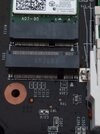
On another note as pc cant use W11 yet as not compatible i wondered on an uprated ssd size but unsure if i can add a blank one into another slot as unsure what i am looking at.
I did see you can get it operating system on it.
More advice needed again please.

Just to add i downloaded Recuva from Microsoft store and scanning Toshiba drive that files got deleted from does say 3 hr. OMG
 

Attachments

  • IMG_20260128_141615_1.jpg
    IMG_20260128_141615_1.jpg
    29.5 KB · Views: 54
Last edited:
I decided for a start 4gb might be lagging and found an 8gb compatible one to clip in and seems better now.

Timetec 8GB DDR3L / DDR3 1600MHz (DDR3L-1600) PC3L-12800 / PC3-12800(PC3L-12800S) Non-ECC Unbuffered 1.35V/1.5V CL11 2Rx8 Dual Rank 204 Pin SODIMM Laptop Notebook PC Computer Memory RAM Module Upgrade​

On another note as pc cant use W11 yet as not compatible i wondered on an uprated ssd size but unsure if i can add a blank one into another slot as unsure what i am looking at.
I did see you can get it operating system on it.
More advice needed again please.

Just to add i do
my computer dell 2011 win 7 had i normal hard drive in and started to slow a bit last year got an ssd from crucial transfered everything of hard drive to the ssd and now running ok
 
My eyes are nearly in the back of my head as it said over 1 million files that got found and as this dry was formatted before using thought cant be many on it WOW
2015 is to old to check as it needs to be 2024 on but unknown format what i originally saved as png , jpg and many others.

Moved about 150 back to different drive to check what they are.

Next i have to check up on ssd to slip in and whether it works as is or what.
 
To recover files it is good to have a copy of Ubuntu on a USB drive and boot to that from BIOS, then scan your windows drive for deleted files, photorec is the program I used to use, but there may be better ones out there now.
 
Need guidance of size of ssd to get to help with space , its an office pc just to view YouTube and forums and download pictures and documents.

Not into gaming or 4k but wired up for nice sounds

Ideas?
 
Need guidance of size of ssd to get to help with space , its an office pc just to view YouTube and forums and download pictures and documents.

Not into gaming or 4k but wired up for nice sounds

Ideas?
You wont need a large one considering you have been working with 32GB and the most your device will take is 512GB.
 
You wont need a large one considering you have been working with 32GB and the most your device will take is 512GB.
Yes i noticed that your capped and would around 200gb be workable and 500gb overboard and expensive.
 
Ordered this one.

EN206 256GB 3D NAND M.2 SSD, M.2 2280 SATA III 6Gb/s SSD Internal Hard Drive, Read/Write Speed up to 550/460 MB/s, Compatible with Ultrabooks, Tablet Computers and Mini PCs​

 
Ordered this one.

EN206 256GB 3D NAND M.2 SSD, M.2 2280 SATA III 6Gb/s SSD Internal Hard Drive, Read/Write Speed up to 550/460 MB/s, Compatible with Ultrabooks, Tablet Computers and Mini PCs​

I would like to know how this will actually work in the sence is it just added as seperate hard drive or does it actually extend storage.
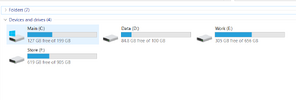
I just changed my M2 in my laptop from iTB to a 2TB one so rather than istalling windows again,

I bought and external usb c to M2 enclosure and used acronis truimage to image the drive.

It done it in two stages I thought it had failed when I had to run it again but it had done system partitions and next partition
then when i ran it again it did the other two partitions I have four partitions setup.
Then I just opened Laptop and swaped them over. So now I can just use older 1TB M2 for backups e.t.c.
Capture.PNG
 
I would like to know how this will actually work in the sence is it just added as seperate hard drive or does it actually extend storage.
I just changed my M2 in my laptop from iTB to a 2TB one so rather than istalling windows again,

I bought and external usb c to M2 enclosure and used acronis truimage to image the drive.

It done it in two stages I thought it had failed when I had to run it again but it had done system partitions and next partition
then when i ran it again it did the other two partitions I have four partitions setup.
Then I just opened Laptop and swaped them over. So now I can just use older 1TB M2 for backups e.t.c.
View attachment 131440
I did ask that question as the storage can be added but not sure if just plug it in or needs anything else done with it.
I also tried adding another passport but pc not boot up.
 
Received off Amazon tonight and slotted it in and screw would not go into hole .

BIGGER STRONGER GLASSES NEEDED AS SCREW WAS IN HOLE 🤣 🤣 🤣 🤣
Removed that screw and in it went
Started up pc and loaded everything and now says 297 of space
No messing with files to load or transfer yet and maybe now ready for W11?
 
Back
Top