I totally agree, Surfshark is really great for IPTV and hardly has any speed loss. I tried various other main ones and this was by far the best for me.As a regular VPN it's probably about the same. I've found it much better for IPTV than Nord in the past and I feel like many others agree. The apps on devices are great and easy to set up for split tunneling and features like that and it has a lot of great features overall. Really my favorite is that it's "unlimited devices". Don't get carried away, but you can easily install it on all of your personal devices and all of your families personal devices and never have an issue. Probably my favorite feature haha
You are using an out of date browser. It may not display this or other websites correctly.
You should upgrade or use an alternative browser.
You should upgrade or use an alternative browser.
Are we stuck with VPN use forever?
- Thread starter hkphooey
- Start date

loncell
TK Veteran
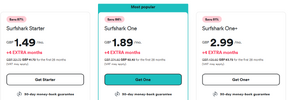
I'm looking into Surfshark the middle package. Quidco do 37.5% cashback for existing customers of Quidco which means it equates:-
£26:08 for the lowest package
£33:08 for the middle package
£52:33 for the top package
I've opted for the middle one for the 7 day trial I'll run it on the stick over the weekend see how it goes
£26:08 for the lowest package
£33:08 for the middle package
£52:33 for the top package
I've opted for the middle one for the 7 day trial I'll run it on the stick over the weekend see how it goes
Quidco were doing 95-100% cashback last week but sadly I missed out! Think will wait till after Xmas to see if they have any better deals.I'm looking into Surfshark the middle package. Quidco do 37.5% cashback for existing customers of Quidco which means it equates:-
£26:08 for the lowest package
£33:08 for the middle package
£52:33 for the top package
I've opted for the middle one for the 7 day trial I'll run it on the stick over the weekend see how it goes
I paid for surshark starter package 28/11/2022 just from their official site,I'm looking into Surfshark the middle package. Quidco do 37.5% cashback for existing customers of Quidco which means it equates:-
£26:08 for the lowest package
£33:08 for the middle package
£52:33 for the top package
I've opted for the middle one for the 7 day trial I'll run it on the stick over the weekend see how it goes
26 month it cost £55.25 GBP at the time it is due to run out in 40 days
and take note it is reccuring payment unless you cancle
and my next payment will now cost £57.37 so going by new prices I wonder if I will still be on older starter package newer packages are cheaper
Attachments
loncell
TK Veteran
So tonight I ran NordVPN and Surfshark in turns testing a 4k stick and 4 different IPTV servers.
I tried WiFi on off and hard wired with Cable Matters adapter I know it shouldn't make a difference but I thought I'd check anyway
I then compared speeds using Analiti just to give a simple comparison. I let both VPN providers select their fastest
Nord went Manchester
Surfshark went Ireland
So my conclusion speed wise there was no difference bar the old meg between all 4 comparisons.
The one difference I noticed was, Nord would freeze a little on 2 of the 4 IPTV servers were as Surfshark was more stable alot less freezing.
To me on my basic check that Surfshark was more friendly with the servers far far less freezing.
ALl the family use Nord on laptops and phones and it will stay that way but I've decided to pay for Surfshark the middle package which, after Quidco it will cost £33:08
Remember, if you use top cashback or Quido do not use the Quidco app on your phone, log on to Quidco on a Laptop or PC through the browser as sometimes using your phone it won't track the cashback.
So personally I'll give Surfshark the thumbs up for IPTV. It seems a more dedicated VPN the TV. I like Nord for the meshnet which is a superb idea
I tried WiFi on off and hard wired with Cable Matters adapter I know it shouldn't make a difference but I thought I'd check anyway
I then compared speeds using Analiti just to give a simple comparison. I let both VPN providers select their fastest
Nord went Manchester
Surfshark went Ireland
So my conclusion speed wise there was no difference bar the old meg between all 4 comparisons.
The one difference I noticed was, Nord would freeze a little on 2 of the 4 IPTV servers were as Surfshark was more stable alot less freezing.
To me on my basic check that Surfshark was more friendly with the servers far far less freezing.
ALl the family use Nord on laptops and phones and it will stay that way but I've decided to pay for Surfshark the middle package which, after Quidco it will cost £33:08
Remember, if you use top cashback or Quido do not use the Quidco app on your phone, log on to Quidco on a Laptop or PC through the browser as sometimes using your phone it won't track the cashback.
So personally I'll give Surfshark the thumbs up for IPTV. It seems a more dedicated VPN the TV. I like Nord for the meshnet which is a superb idea

OneMoreRound
Newbie
I’ve been having trouble using lpeetv lately. Whenever I turn on my Express VPN many of the locations cause it to buffer, I’d mostly use European locations, got on to chat with them, and he asked me to use US locations (I’m in Republic of Ireland) and they seemed to work better. I thought closer would be better….?

ONeSide
Newbie
🌍 Pro Tip! 🌍I’ve been having trouble using lpeetv lately. Whenever I turn on my Express VPN many of the locations cause it to buffer, I’d mostly use European locations, got on to chat with them, and he asked me to use US locations (I’m in Republic of Ireland) and they seemed to work better. I thought closer would be better….?
💡 Before setting up, ask your provider where their VPS servers are located. The most common locations are Portland or the Netherlands. 🌐
👉 If you're having connection issues or looking for better performance, try setting your VPN to one of these locations for optimal results. 🚀
Stay streaming smoothly! 🎥✨
And do you really think providers will just pass on that info on to a new menber but I do know one supplier who says connect to usa as a uk user I prefer somewhere closer less delay.🌍 Pro Tip! 🌍
💡 Before setting up, ask your provider where their VPS servers are located. The most common locations are Portland or the Netherlands. 🌐
👉 If you're having connection issues or looking for better performance, try setting your VPN to one of these locations for optimal results. 🚀
Stay streaming smoothly! 🎥✨
ONeSide
Newbie
i mean is not really to hard to find out using simple command prompt. Using route trace the end location is the location you would use. Been provided the info and it has worked.And do you really think providers will just pass on that info on to a new menber but I do know one supplier who says connect to usa as a uk user I prefer somewhere closer less delay.

moshibeth
VIP Member
Dubai and UAE are pretty good hosts for suppliers.And do you really think providers will just pass on that info on to a new menber but I do know one supplier who says connect to usa as a uk user I prefer somewhere closer less delay.
spudulik67
Newbie
Nord is ok, don't trust no VPN fully currently.

I use a VPN always have done but don't actually need to so I guess its down to provider. The issue of where stuff is hosted is a bit of a myth whether you host in Netherlands or the other side of the world we are talking mili seconds.
Its more down to if your supplier uses live or on demand streams
Its more down to if your supplier uses live or on demand streams
Last edited:
On virgin myself never had a issue most of the time I think people forget to turn off nanny settings that can cause issues@mike123
And on the other hand - I have never used a VPN (IPTV service works fine..) :: my broadband comes from VM if that could/might make a difference.....

Klxzc1345
Newbie
New to the tech kings forum. Have lurked for a few years. Got sick of reddit nonsense.
I keep seeing it mentioned "do not want to use VPN" Why do users not want to need a VPN? It takes the guess work out if you are being throttled. For any user who isn't great with technology and not wanting to put a VPN on every box/tv/device. Get a Router that allows a VPN network.
My home router has 3 networks. Main Network 5 ghz for day to day use. A second network that is 2.4 ghz for devices like smart bulbs, washing machine, security cameras. The third network is 5 ghz with VPN. All my streaming devices are connected to it. No need to turn a vpn on in the box or phone. Now the router is doing the heavy lifting which it is made to do. The box can simply concentrate on playing tv. I get 400+ mb speeds. I have a second cheap router from the same brand as an access point for outside and garage streaming. When we go on vacation. Unplug this small router. Throw it in the backpack. Plug it in at the hotel or copy the hotel wifi. Instant access for all phones, tablets, tv streaming devices.
If you use your ISP modem/router. Put it in bridge mode. Plug this router with vpn into it. Copy the SSID info. Everything is up and running in minutes.
I can help share info on how to do this if anyone is interested.
I keep seeing it mentioned "do not want to use VPN" Why do users not want to need a VPN? It takes the guess work out if you are being throttled. For any user who isn't great with technology and not wanting to put a VPN on every box/tv/device. Get a Router that allows a VPN network.
My home router has 3 networks. Main Network 5 ghz for day to day use. A second network that is 2.4 ghz for devices like smart bulbs, washing machine, security cameras. The third network is 5 ghz with VPN. All my streaming devices are connected to it. No need to turn a vpn on in the box or phone. Now the router is doing the heavy lifting which it is made to do. The box can simply concentrate on playing tv. I get 400+ mb speeds. I have a second cheap router from the same brand as an access point for outside and garage streaming. When we go on vacation. Unplug this small router. Throw it in the backpack. Plug it in at the hotel or copy the hotel wifi. Instant access for all phones, tablets, tv streaming devices.
If you use your ISP modem/router. Put it in bridge mode. Plug this router with vpn into it. Copy the SSID info. Everything is up and running in minutes.
I can help share info on how to do this if anyone is interested.

The biggest issue for me is high quality content HDR , HDR10 vpn causes annoying jitter ....i have to bypass stremio and other HQ apps via my vpn settings...kind of defeats the object..New to the tech kings forum. Have lurked for a few years. Got sick of reddit nonsense.
I keep seeing it mentioned "do not want to use VPN" Why do users not want to need a VPN? It takes the guess work out if you are being throttled. For any user who isn't great with technology and not wanting to put a VPN on every box/tv/device. Get a Router that allows a VPN network.
My home router has 3 networks. Main Network 5 ghz for day to day use. A second network that is 2.4 ghz for devices like smart bulbs, washing machine, security cameras. The third network is 5 ghz with VPN. All my streaming devices are connected to it. No need to turn a vpn on in the box or phone. Now the router is doing the heavy lifting which it is made to do. The box can simply concentrate on playing tv. I get 400+ mb speeds. I have a second cheap router from the same brand as an access point for outside and garage streaming. When we go on vacation. Unplug this small router. Throw it in the backpack. Plug it in at the hotel or copy the hotel wifi. Instant access for all phones, tablets, tv streaming devices.
If you use your ISP modem/router. Put it in bridge mode. Plug this router with vpn into it. Copy the SSID info. Everything is up and running in minutes.
I can help share info on how to do this if anyone is interested.
It's just that reduction in speed that is my biggest issue I've tried many surfshark is the best but still plays havoc with my HDR + content

I had some issues with more and more Surf Shark server locations late last year and have since moved to Nord.