AB PULSe 4K Rev. II tuner setup and recording issues

Eh! gringo

Newbie
Hi All
I have recently purchased the AB PULSe 4K Rev. II (2XS2X) and I am looking for some direction/help in the set up of the tuners, as I see a lot of discrepancies when recording FTA and trying to view a different FTA channel. Current set up below and some of the issues I am experiencing:
Just to note I have been using a Zgemma h2s for the last number of years with little or no issue recording FTA and watching another. (Changed to this current box as the IPTV viewing is better on the box and it seems a lot faster). Happy so far with Pulse 4K just this issue is catching me out.

Latest Open ATV Image

FTA UK Channels all showing and play as normal.
Set up is a standard Dish with recently installed V -Output Universal Quad LNB - 2 physical cables connected to Tuners A&B - No issue with this on Zgemma.

Current Tuner set up (Same as Zgemma):
Tuner A
Simple
Single
Satellite: 28.2E

Tuner B
Simple
Single
Satellite: 28.2E

I tried changing Tuner B to say "Same as Tuner A" = Didn't work

issues are:
  1. I record on a HD/SD channel, e.g. E4 HD and then i zap to other FTA channels and for the most part a lot of other HD channels wont load - Black screen. Some HD channels do load and work OK - e.g. ITV 4 HD
  2. I record on a HD/SD channel, e.g. E4 HD and then i zap to other FTA (HD Channels) channels and it loads but a lot of jittering and skipping (This sometimes resolves itself after about 10-15 sec if you stay on channel?
  3. I record on a HD/SD channel, e.g. E4 HD and then i zap to other FTA channels (HD Channels) and the the picture is there but no sound
  4. Regards all of the above, when i actually play the recording there is a lot of freezing and stuttering, as it looks like this is due to me zapping whilst recording
  5. If I just leave on the recording channel whilst recording and then play there is no issue with playback.
Seems the issue is around whilst recording HD/SD, or my tuners set up is wrong for this box.

Any help/direction on the above would be greatly appreciated

Regards
 
Last edited:
If you have universal quad LNB, your tuners are set correctly. (It would be same no matter what receiver.) I am afraid you will have to fault find and rule things out. However, can you please expand on what you mean by "V output" when you described your LNB. I hope you don't have a Quattro LNB. As that would have Vertical and Horizontal outputs.

Please double check the f-plug connectors as they sometimes work loose especially when changing receivers. Are you using the same Power supply as your previous receiver? Disable one tuner at a timer and perform a Single satellite scan. (Do not use plugins like ABM for this test.) How many channels do you get? Repeat on other tuner.
 
If you have universal quad LNB, your tuners are set correctly. (It would be same no matter what receiver.) I am afraid you will have to fault find and rule things out. However, can you please expand on what you mean by "V output" when you described your LNB. I hope you don't have a Quattro LNB. As that would have Vertical and Horizontal outputs.

Please double check the f-plug connectors as they sometimes work loose especially when changing receivers. Are you using the same Power supply as your previous receiver? Disable one tuner at a timer and perform a Single satellite scan. (Do not use plugins like ABM for this test.) How many channels do you get? Repeat on other tuner.
I bought LNB in Screwfix and this is the description on the invoice - V -Output Universal Quad LNB
I tried Re-connected everything a few times now,
Not using the same power supply - using one that came with the Pulse receiver
Recording on Tuner A & signal quality is at 60% on Tuner B (Signal Quality similar to Tuner A when not recording) - Maybe dish set up is the issue, Dish is also about 15 years old
 
Last edited:
Please perform the scan and post back the results. It will be a good indicator. As per other forum, signal seems a bit low. But that may be just driver issues needing an adjustment.

You are focusing on recording, I am looking at reception. Recording is dependent on reception.
 
When you say standard dish, do you mean an industry standard dish or a standard sky mini dish. The visiowave LNB that Screwfix sells is designed for Sky dishes which have 38mm collars. Industry standard ones use 40mm collars.

I note you are in the middle of RoI.
 
Please perform the scan and post back the results. It will be a good indicator. As per other forum, signal seems a bit low. But that may be just driver issues needing an adjustment.

You are focusing on recording, I am looking at reception. Recording is dependent on reception.
Sorry for the delay in replying.
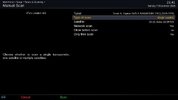
Below are the steps I carried out to scan each tuner and the results, hope this is what you are looking for.
  1. Set Up - Tuners, scanning & Reception
  2. Tuner Configuration - Set Tuner B to not configured
  3. Tuners, scanning & Reception Manual Scam - Tuner A is only Option - Green button to Run Scan
  4. Results come back with 10 Services found - Although Initial Scan on first set up pulled in all FTA channels
  5. All BBC Channels
  6. Same as above and enabled Tuner B and that brings back No channels - No services found
Dish = standard sky mini dish.
Hope this helps
 
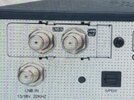
That box has 3 f connectors at the rear and one of those is loop out. Its easy to think the 2 at the top are the tuners but its only the one on the left see pic. Can you confirm you have the 2 on the left connected. Its an easy mistake.
 

Attachments

  • IMG_9359.jpeg
    IMG_9359.jpeg
    95.5 KB · Views: 85
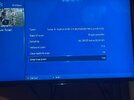
The scanning options should be as pictured here.

single satellite scan.jpg

If you are getting less than 670 channels on a scan from a tuner, there is a reception issue with the equipment connected to that tuner. This could be dish, cable, lnb etc.
 
Change the scanning option from a single "user/defined transponder" to "single satellite".
It was defaulted to "Predefined transponder"
I Disabled Tuner B then changed Tuner A to User "defined transponder" (No other choice) - ran the scan and it pulled in 28 Services this time with the majority ITV and NO BBC
Repeated above with Tuner B and the scan pulled in no services
 
Please change it to single satellite. Press right or left to change it. Post a screenshot of the scanning option you are using.

We want to establish if you have a reception issue. Scanning a satellite is the simplest way we are going to do that. Lots of people check one or few transponders and declare they have "good signal" when they can't receive other transponders properly.
 
When did you change lnb? It appears to be a signal issue or you are on wrong pararmeters, ie scan the satellite not just transponders as Abu shows. Here is my pic and I would say FTA Yes, you dont want all the encytpted channels,

Type of scan toggle to single satellie ie use rght arrow
 

Attachments

  • IMG_9365.jpeg
    IMG_9365.jpeg
    199.7 KB · Views: 83
Please don't enable the FTA option. It's going to skew the results. We are diagnosing an issue, not setting up you receiver!

The encrypted channels will get added in by background scanning anyway.
 
Please change it to single satellite. Press right or left to change it. Post a screenshot of the scanning option you are using.

We want to establish if you have a reception issue. Scanning a satellite is the simplest way we are going to do that. Lots of people check one or few transponders and declare they have "good signal" when they can't receive other transponders properly.
Sorry my bad, on the last scan I was doing the scan through Signal Finder option

I have now went to manual option - and changed to Single and few hundred channels came on A
B tuner had zero ( saying YES to FTA only)
 
Last edited:
Please don't enable the FTA option. It's going to skew the results. We are diagnosing an issue, not setting up you receiver!

The encrypted channels will get added in by background scanning anyway.
Just seen this post But Tuner A pulled in over 600 channels without enabling FTA only
Edit - Tuner B pulled in 10 services - mostly BBC - without enabling FTA only
 
Did tuner B get the same number of channels?

600 is not enough, you will have to adjust LNB/dish.

Edit:
Sky mini dish in use.
 
Last edited:
If you have set the scan correctly, tuner B is missing about 680 channels. There is a fault with the LNB, cable, connector. I doubt it's the receiver/tuners. You can rule out the tuner by swapping the cables around.

Incidentally, E4 HD is not free to air. If it's working and breaking up, it's the share you are using.
 
Sorry for the delay in replying.
Below are the steps I carried out to scan each tuner and the results, hope this is what you are looking for.
  1. Set Up - Tuners, scanning & Reception
  2. Tuner Configuration - Set Tuner B to not configured
  3. Tuners, scanning & Reception Manual Scam - Tuner A is only Option - Green button to Run Scan
  4. Results come back with 10 Services found - Although Initial Scan on first set up pulled in all FTA channels
  5. All BBC Channels
  6. Same as above and enabled Tuner B and that brings back No channels - No services found
Dish = standard sky mini dish.
Hope this helps
Are you not supposed to do an automatic scan as it seems that a manual scan only scans 1 transponder (I think that's correct) as you say you only got BBC channels.

I don't have your box but a Tiviar plus and that's what I do to get over 300 channels on my sat box.
 
Automatic scan has few options. Manual scan allows you to choose what to scan. The default selection is the current tuner and current transponder for most images. He was asked to scan the satellite. Maybe next time it will be better to tell the person to change the options and select the whole satellite.

If a complete scan of 28.2 only brings in 300 channels for you, you have an issue. Please double check the number of channels you are getting. Set the scanning options as pictured above.
 
Back
Top