You are using an out of date browser. It may not display this or other websites correctly.
You should upgrade or use an alternative browser.
You should upgrade or use an alternative browser.
Firestick remote control not working
- Thread starter corriemar
- Start date
Unplugging the power pressing the home button 10 times and holding back,home and left at the same time.What's the usual stuff,?

pabloescaban
VIP Member
Checking the batteries, changing the batteries, swearing at the TV, calling the remote a prick etcWhat's the usual stuff,?

moshibeth
VIP Member
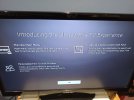
Put new batteries in the remote and pair it as a new remote. Hold down the house icon button for 30+ seconds then try.Remote not responding after a update I have tried the usual stuff but no joy .
This is the screen I get any help would be appreciated thanks in advance. View attachment 70809
Also tried that lolPut new batteries in the remote and pair it as a new remote. Hold down the house icon button for 30+ seconds then try.
moshibeth
VIP Member
Is it the older generation 2 stickAlso tried that lol
It's the firestick lite i believe the one with just the microphone button on itIs it the older generation 2 stick

bazcfc1
VIP Member
How To Fix a Firestick Remote That’s Not Working.
If your Firestick remote shows no light, try unplugging the Fire TV stick from the back of your device and wait 20 seconds. Plug it back in to see if the issue is solved. ... Press the “Home” button for “10 seconds” to re-pair it. Repeat the process a few times if neccessary.
Reset Your Fire TV Remote - Amazon Customer Service
If your Firestick remote shows no light, try unplugging the Fire TV stick from the back of your device and wait 20 seconds. Plug it back in to see if the issue is solved. ... Press the “Home” button for “10 seconds” to re-pair it. Repeat the process a few times if neccessary.
- Press and hold the Home button. ...
- Release the Home button.
- Press the Menu button 9 times.
- Remove the batteries from your remote.
- Unplug your Fire TV and wait 60 seconds.
- Put the batteries back in your remote, and then plug in your Fire TV.
- Once the Home screen appears, press and hold the Home.
Alexa Voice Remote Lite
Note: This remote doesn't have a power button or volume up/down buttons.- Unplug your Fire TV and wait 60 seconds.
- Press and hold the Left button, Menu
 button, and Back
 button at the same time. Hold them for 12 seconds.
- Release the buttons and wait 5 seconds.
- Remove the batteries from your remote.
- Plug in your Fire TV and wait 60 seconds.
- Put the batteries back in your remote.
- Press the Home button on the remote

Reset Your Fire TV Remote - Amazon Customer Service
Thank you for that but I have already tried that as I googled it before I asked the question on here.How To Fix a Firestick Remote That’s Not Working.
If your Firestick remote shows no light, try unplugging the Fire TV stick from the back of your device and wait 20 seconds. Plug it back in to see if the issue is solved. ... Press the “Home” button for “10 seconds” to re-pair it. Repeat the process a few times if neccessary.
- Press and hold the Home button. ...
- Release the Home button.
- Press the Menu button 9 times.
- Remove the batteries from your remote.
- Unplug your Fire TV and wait 60 seconds.
- Put the batteries back in your remote, and then plug in your Fire TV.
- Once the Home screen appears, press and hold the Home.
Alexa Voice Remote Lite
Note: This remote doesn't have a power button or volume up/down buttons.
- Unplug your Fire TV and wait 60 seconds.
- Press and hold the Left
button, Menubutton, and Backbutton at the same time. Hold them for 12 seconds.- Release the buttons and wait 5 seconds.
- Remove the batteries from your remote.
- Plug in your Fire TV and wait 60 seconds.
- Put the batteries back in your remote.
- Press the Home
button on the remote
Reset Your Fire TV Remote - Amazon Customer Service
Really appreciate all the answers thanks again.
I cannot get the home screen to put the code in.Have you tried using the firetv phone app.
You can try to re pair your remote through that.
Quick video here maybe some use maybe not lol
Have you tried using your Samsung TV remote to operate the stick?Remote not responding after a update I have tried the usual stuff but no joy .
This is the screen I get any help would be appreciated thanks in advance. View attachment 70809
bazcfc1
VIP Member
You need to go into firestick settings and enable hdmi cecHave you tried using your Samsung TV remote to operate the stick?

steptoe
VIP Member
Could do that using the phone appYou need to go into firestick settings and enable hdmi cec
I cannot use the phone app as I can't get the code it's asking for .Could do that using the phone app
steptoe
VIP Member
Use the phone app to set up CEC , then you can use your TV remote to control your FSManaged to get the app on the phone working code appeared on the screen but still no joy with the remote as yet but will persevere.
Thanks for all the help.
Similar threads

- Replies
- 3
- Views
- 58
- Replies
- 82
- Views
- 2K

- Replies
- 6
- Views
- 74
- Replies
- 21
- Views
- 525
