Viark VIARK TYPE BOXES

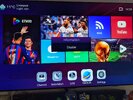
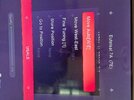
Booted it up main screen if you press 6666 you get either disabled or enabled , depends what it's set to before you press 6666.

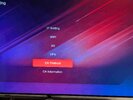
You then go to network and should see cs protocol, how ever if disabled popped up on the main screen you won't see it and pressing 6666 whilst in this menu won't bring up cs protocol. You have to go back out to main screen press 6666 and see enabled pop up. Then cs protocol will be present

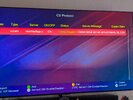
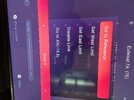
Click on that and you will see your cccam key . If it's ON and expiry..

I subbed VIP to test and the online checker above shows both VIP and standard TV. GTVod ( main menu)on the box also gives you your VIP expiry

Oh and SkyIT is off
 

Attachments
  • PXL_20260220_142444259.MP.jpg
    PXL_20260220_142444259.MP.jpg
    1.7 MB · Views: 89
  • PXL_20260220_142433974.MP.jpg
    PXL_20260220_142433974.MP.jpg
    1.4 MB · Views: 99
  • PXL_20260220_142624301.MP.jpg
    PXL_20260220_142624301.MP.jpg
    999.6 KB · Views: 86
  • PXL_20260220_142603982.MP~2.jpg
    PXL_20260220_142603982.MP~2.jpg
    1.2 MB · Views: 92
Last edited:
Are you aware Sky IT is only available on the VIP sub mate ? Its not on the standard Mars sub.
[/QUOTE. I am on VIP sub guys sorry if I am confusing anyone here , and before the problem with 666 thing sky Italia was opening , but now not , so that's why I was asking ? Guys any with VIP Is it sky Italia currently opening ? My VIP sub expiry date 30/04/26 👍
 
Booted it up main screen if you press 6666 you get either disabled or enabled , depends what it's set to before you press 6666.

You then go to network and should see cs protocol, how ever if disabled popped up on the main screen you won't see it and pressing 6666 whilst in this menu won't bring up cs protocol. You have to go back out to main screen press 6666 and see enabled pop up. Then cs protocol will be present

Click on that and you will see your cccam key . If it's ON and expiry..

I subbed VIP to test and the online checker above shows both VIP and standard TV. GTVod ( main menu)on the box also gives you your VIP expiry

Oh and SkyIT is off
Thanks for clarification m8
 
Quick question guys, not 28.2e or VIP related at last! haha.

When the Viark finds a BISS key using auto BISS is there a way to view the key to share with others?
 
Quick question guys, not 28.2e or VIP related at last! haha.

When the Viark finds a BISS key using auto BISS is there a way to view the key to share with others?
Yes its in keys menu.

Menu
Net & Games
Scroll to page 3/3
Key Menu
Scroll right to BISS
Scroll to bottom you will see the ID and Keys

Or

Press INFO then 147
Scroll right to BISS
Scroll to bottom you will see the ID and Keys
 
Last edited:
Quick question guys, not 28.2e or VIP related at last! haha.

When the Viark finds a BISS key using auto BISS is there a way to view the key to share with others?
I've seen some dubios looking sellers on facebook claiming to supply an alternative Biss AU subscription for our boxes. 2.5USD

This is probably due to auto biss on these type of boxes also been on its knees.
 
I haven't updated my DRS2 to 153 yet and supersport on 16e is not working but has been fine up till now is it working ok for others today who have updated to 153 ?
 
Is there anyone willing to help me out with the usals settings on the gt media. Currently using diseq but would like to switch over without making mistakes.
Thanks.
 
Is there anyone willing to help me out with the usals settings on the gt media. Currently using diseq but would like to switch over without making mistakes.
Thanks.
Enter your postcode in here to get your coordinates

GPS coordinates, latitude and longitude with interactive Maps


On your V8 Press

Menu-Installation-Usuals Setup

Enter your Latitude & Londitude figures. A minus figure on longditude is a West Setting on the box.

Rotor Speed set to 9
 

Attachments

  • 20260222_132542.jpg
    20260222_132542.jpg
    1.6 MB · Views: 72
  • 20260222_132527.jpg
    20260222_132527.jpg
    1.7 MB · Views: 76
Hi everyone just had my 1.2m satellite dish installed today and I’ve scanned nilesat 7W for beIN sports. I’ve got the bein English channels 1 and 2 also bein sports xtra and beIN sports 9 and the French ones. I can’t get all the other bein arabic channels 1,2,3,4,5,6 etc they have not come up on the channel list.
Can someone help as the bein English 1 and 2 are locking in very well. But I want the others as well as you can use the language button to change commentary.
 
Hi everyone just had my 1.2m satellite dish installed today and I’ve scanned nilesat 7W for beIN sports. I’ve got the bein English channels 1 and 2 also bein sports xtra and beIN sports 9 and the French ones. I can’t get all the other bein arabic channels 1,2,3,4,5,6 etc they have not come up on the channel list.
Can someone help as the bein English 1 and 2 are locking in very well. But I want the others as well as you can use the language button to change commentary.
Bein 1 - 8 are on 8w
 
Back
Top