WilloBuild WilloBuild OpenViX 6.9 Series

Ok got it. If I press menu, set up, system, software update. I’ve got 72 at the moment. If I do what was said above I get to >ABOUT and it crashes and restarts
 
Just do this bit then:

Make a settings backup in Backup Manager.
Download the latest image In Image Manager.
Flash the new image to a different partition with Image Manager.
Restore the settings backup.
 
Yep. I’ve downloaded the latest vix to slot 2 but when I go to multiboot image selector the box crashes and restarts. The box is actually working fine on slot one so I guess without doing a fresh install through putty and starting again I’m best to leave it alone.
 
What box is it? Some boxes allow you to choose which slot to boot from if you hold the power button when booting.
You can change slot from putty too.
 
I haven't got a H7 at the moment to check but this works on the H9 from putty.
Just change the number after LINUX to the number of the partition you flashed.

#!/bin/bash
init 4
cd /boot
cp STARTUP_LINUX_4 STARTUP
reboot
exit 0
 
Ok thanks I’ll try that. When I restore settings does it give the same xtreme editor code as I have now or would I then need to contact my provider with a new code generated on slot 2
 
You been spoiled over the years Big boy 😁
Not any more! 😢

tantrum.gif
 
I've been labouring for years on Wooshbuild on my ZGemma H2S and decided to move over to Willobuild. I connected via Terminal and an error occurred;

--2025-10-19 17:43:22-- https://www.openvix.co.uk/index.php/downloads/-images/
Resolving www.openvix.co.uk... 176.31.181.161
Connecting to www.openvix.co.uk|176.31.181.161|:443... connected.
ERROR: cannot verify www.openvix.co.uk's certificate, issued by ‘CN=GlobalSign GCC R6 AlphaSSL CA 2025,O=GlobalSign nv-sa,C=BE’:
Unable to locally verify the issuer's authority.
To connect to www.openvix.co.uk insecurely, use `--no-check-certificate'.
wget: missing URL
Usage: wget [OPTION]... ...[/B] Is this an error at openvix's end? Thanks for the help.
 
I've been labouring for years on Wooshbuild on my ZGemma H2S and decided to move over to Willobuild. I connected via Terminal and an error occurred;

--2025-10-19 17:43:22-- https://www.openvix.co.uk/index.php/downloads/-images/
Resolving www.openvix.co.uk... 176.31.181.161
Connecting to www.openvix.co.uk|176.31.181.161|:443... connected.
ERROR: cannot verify www.openvix.co.uk's certificate, issued by ‘CN=GlobalSign GCC R6 AlphaSSL CA 2025,O=GlobalSign nv-sa,C=BE’:
Unable to locally verify the issuer's authority.
To connect to www.openvix.co.uk insecurely, use `--no-check-certificate'.
wget: missing URL
Usage: wget [OPTION]... ...
Is this an error at openvix's end? Thanks for the help.[/B]
Willobuild does not support that box or does openvix. If you try flashing it will brick the box stick to openatv.
 
Ah, thanks for letting me know. Saved me there. I'll look to see what else I can use.

I have an H9.2S as well, might just have to upgrade the H2S
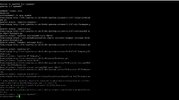
 
Hi All wondering has anyone encountered this before as I am stumped what the problem is. I have a zgemma h7s been fairly solid but as mentioned in previous post tend to reflash every 16 months due to what look like software issues. Have 2 problems at present. Firstly the provider uses XE plugin and since monday getting a "file download error" on bouquet imports and eventually all his stuff disappears. my brother developed the same problem last week on a Vu Solo box. I think it may be cause by not maintaining latest XE plugin version.

Anyway it wont update on the machine just causes a gui reboot. so i decided to flash given my network issue i had seen.

I flashed firstly to 6.7.20 there today and once up did the willobuild command, all good box booted up and got to restore from backup and restore plugins. clicked yes and it took a while but came back it could not connect to plugins due to network connection and asked to reboot. I was left with a half install but noticed my network issue was still there.

efffectively when i reboot now the network link does not show as up on the device. i have to restart the network adapter and onscreen the link light appears green., this was the same when running the 6.6.3 image I had before flashing. I changed network cable and port in the router and no difference but network works after network restart. I can access the provider stuff and download new images but when i select download plugins it tells me I am not connected to the internet?

Started about 3 weeks ago, have rebooted the router and box many times since but no change. strange part is its boots fine which I recall willo mentioning before it needs internet to do that but adapter seems to die when up and needs restart but as mentioned even that has problems with plugins access.

any ideas of diagnosis would be good. I seen in earlier comments testing opkg update to see results and it looks fine but cant connect from plugins menu, download plugins still tells me no internet.

Have flashed a backup image i took when the problem started so at least up and running but will lost provider bouquets in a day or 2 again as I can seem to update the XE plugin.
 

Attachments

  • opkg update.JPG
    opkg update.JPG
    116.3 KB · Views: 87
Back
Top