Satellite Z-gemma H7s slow to change channels

Usb is a duffer, try formatting it first FAT32, then put the unzipped folder on there and try again.
What make and size is the usb?
its 15G not not sure of the make, name is rubbed off.
it was formatted to fat32

Ill try the unzipped file.


how does my xstreamity look?
X-streamity
4.02.20230510

It nearly 3 years old?
 
Last edited:
its 15G not not sure of the make, name is rubbed off.
it was formatted to fat32

Ill try the unzipped file.


how does my xstreamity look?
X-streamity
4.02.20230510

It nearly 3 years old?
Give willobuid a try on another slot. 3 years is old for that plugin the developer keeps his stuff up to date all the time.

Best sticking to genuine sandisk flash drives when flashing these zgemma boxes via USB they never fail.

Try this full step by step guide

WilloBuild OpenViX 6.7 Series
 
Give willobuid a try on another slot. 3 years is old for that plugin the developer keeps his stuff up to date all the time.

Best sticking to genuine sandisk flash drives when flashing these zgemma boxes via USB they never fail.

Try this full step by step guide

WilloBuild OpenViX 6.7 Series
so followed the steps, still not upgrading, must be the USB.

Is there a way if i access using filezilla?

Which folder would i drop the upgrade into?

Is t the developer who upgrades, nothing i can do?
 
Last edited:
Using ftp, such as Filezilla, navigate to /usr/bin/
Backup the following files to your PC. ofgwrite, ofgwrite_bin, ofgwrite_test

Unzip the attachment and replace the existing files in /usr/bin/ Ensure that they still have 755 properties.
Reboot, then try to "flash online" again.
 

Attachments

so followed the steps, still not upgrading, must be the USB.

Is there a way if i access using filezilla?

Which folder would i drop the upgrade into?

Is t the developer who upgrades, nothing i can do?
You can flash that without a usb

Do the recovery method i posted

To get the recovery menu on a Zgemma H7S, you need to use the physical power button on the front of the box while turning it on.
Steps to Access the Recovery Menu:
  1. Power Off: Turn off the Zgemma H7S using the switch at the back.
  2. Locate Button: Ensure no other USB devices are plugged in. Locate the power button behind the front flap.
  3. Power On & Hold: Turn on the power switch at the back, and immediately PRESS AND HOLD the front power button.
  4. Wait for Display: Continue holding the button until "FLSH" (or sometimes "boot" followed by the menu) appears on the front display.
  5. Release: Release the button. The box should now boot into the recovery menu.
 
Using ftp, such as Filezilla, navigate to /usr/bin/
Backup the following files to your PC. ofgwrite, ofgwrite_bin, ofgwrite_test

Unzip the attachment and replace the existing files in /usr/bin/ Ensure that they still have 755 properties.
Reboot, then try to "flash online" again.
He can online flash from the recovery menu to from memory abu ?
 
You can flash that without a usb

Do the recovery method i posted

To get the recovery menu on a Zgemma H7S, you need to use the physical power button on the front of the box while turning it on.
Steps to Access the Recovery Menu:
  1. Power Off: Turn off the Zgemma H7S using the switch at the back.
  2. Locate Button: Ensure no other USB devices are plugged in. Locate the power button behind the front flap.
  3. Power On & Hold: Turn on the power switch at the back, and immediately PRESS AND HOLD the front power button.
  4. Wait for Display: Continue holding the button until "FLSH" (or sometimes "boot" followed by the menu) appears on the front display.
  5. Release: Release the button. The box should now boot into the recovery menu.
Thanks for help.

Tried this several times. FLSH does not pop up boot comes up, i have tried with USB without USB. no recovery comes up on the front screen.
I got a different usb, followed the steps and something very quckly flashed up so i released the button. Now the stuck on boot again. Ill give it 10 mins and see.


Would a factory reset be my next option if this doesn't work. There is something not quiet right with it. not sure.
 
Using ftp, such as Filezilla, navigate to /usr/bin/
Backup the following files to your PC. ofgwrite, ofgwrite_bin, ofgwrite_test

Unzip the attachment and replace the existing files in /usr/bin/ Ensure that they still have 755 properties.
Reboot, then try to "flash online" again.
Thanks for your help.
Tried this and nothing changed.
 
Thanks for help.

Tried this several times. FLSH does not pop up boot comes up, i have tried with USB without USB. no recovery comes up on the front screen.
I got a different usb, followed the steps and something very quckly flashed up so i released the button. Now the stuck on boot again. Ill give it 10 mins and see.


Would a factory reset be my next option if this doesn't work. There is something not quiet right with it. not sure.
Have you got or kept a record of the box IP address ?
 
Never factory reset as can screw things up , forgot to mention if using usb make sure no other usb is plugged in to confuse it.
 
When you flash the h7s from a usb you can’t flash it again using a usb. You can only flash it using a recovery image and that deletes all the slots. With the Pure2 image there is or was a facility where you can flash on the fly using an image either on the hdd or a usb BUT the image must be zipped. You then get a choice of partitions to flash. It may be possible to even flash online using PURE2 but as the image is ancient that facility may be blocked/withdrawn.

There is a multiboot option and that should be checked in case there is an image on another slot.

Flashing online from the recovery image has me gobsmacked as you can only get an online image from an image, like vix image manager, and press yellow gives vix, openatv, opnpli,openbh and that’s it.

Box is 3 years old with internal hdd and epg stored on internal flash may mean it’s ……..ed. Removing the iptv plugins and reinstalling the latest or better still use bouquetmaker may solve the problem.
 
Last edited:
When you flash the h7s from a usb you can’t flash it again using a usb. You can only flash it using a recovery image and that deletes all the slots. With the Pure2 image there is or was a facility where you can flash on the fly using an image either on the hdd or a usb BUT the image must be unzipped. You then get a choice of partitions to flash. It may be possible to even flash online using PURE2 but as the image is ancient that facility may be blocked/withdrawn.

There is a multiboot option and that should be checked in case there is an image on another slot.

Flashing online from the recovery image has me gobsmacked as you can only get an online image from an image, like vix image manager, and press yellow gives vix, openatv, opnpli,openbh and that’s it.

Box is 3 years old with internal hdd and epg stored on internal flash may mean it’s ……..ed. Removing the iptv plugins and reinstalling the latest or better still use bouquetmaker may solve the problem.

Thanks for your reply.
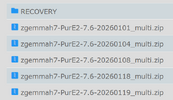
So should i have been using a file from the recovery folder in the image??
1769284706755.png

Is it worth my while trying again if so?
 

Attachments

  • 1769284643151.png
    1769284643151.png
    37.1 KB · Views: 41
When you flash the h7s from a usb you can’t flash it again using a usb. You can only flash it using a recovery image and that deletes all the slots. With the Pure2 image there is or was a facility where you can flash on the fly using an image either on the hdd or a usb BUT the image must be unzipped. You then get a choice of partitions to flash. It may be possible to even flash online using PURE2 but as the image is ancient that facility may be blocked/withdrawn.

There is a multiboot option and that should be checked in case there is an image on another slot.

Flashing online from the recovery image has me gobsmacked as you can only get an online image from an image, like vix image manager, and press yellow gives vix, openatv, opnpli,openbh and that’s it.

Box is 3 years old with internal hdd and epg stored on internal flash may mean it’s ……..ed. Removing the iptv plugins and reinstalling the latest or better still use bouquetmaker may solve the problem.
I never took to the purE2 image it was to much like the old kodi for my liking.
 
Ooops my post may be misunderstood NB the image must be stay ZIPPED when copied to the USB or when downloaded to the USB, that's important as Pure2 wont see it.

I would stay away from pure2 for now you can always add it later BUT when you use recovery all the partitions are wiped and then partition 1 is flashed with the recovery image you used and you configure as normal. Then you have access to Vix image manager.

I was watching the footie when posting and Bournemouth scored so was distracted!!

And when using recovery you do unzip file.
 
Back
Top