Gigablue & motor issues

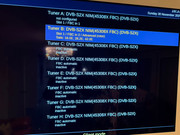
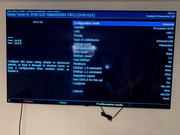
You have jumped the gun and done too many .. lll try this etc. tell me image version and skin, you have motor on tuner B show a pic of settings, tuner a show that.

You can move dish to 16e manually by pushing button.

can you reach dish easily?

However, this is a trick I use but dont try yet. in fact i'll pause. tell me the bits first

yes 16e is best but 12pm ko so be quick
 
You have jumped the gun and done too many .. lll try this etc. tell me image version and skin, you have motor on tuner B show a pic of settings, tuner a show that.

You can move dish to 16e manually by pushing button.

can you reach dish easily?

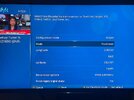
Hey bud, I'll upload photo settings of the e2 tuners. including image ver and skin.

Dish is mounted to external garage. Can't get to it - unless I buy some ladders and get myself up there. How do you move the dish manually?
 
oops 12 ko is approaching as you are on 19e 16e is only a tad away. I hope you can coonect the viark as well as the giga, go menu setup, tuners and scanning, positioenr setup, use fine movemnt to nudge dish to 16e and have viark on ss1 but you have to leave it like that ie on that menu as you cant save it and it may leave screen after a period. Its just an idea. Mind you game may be over very quickly with that shower!!

Another way is to get to dish and push button.
 
Managed to move the dish to 16.e with the viark scanning manually. I’ll watch the united game and then get the e2 box back on!
 
In stead of trying to move the dish via the positioner menu why not just download a channel list from the plugins menu, menu, plugins, green button then go into setting and. download a list like creif rotating. You can use a channel like Al-Jazeera on each sat as the reference channel to make sure you are on that sat. This allows for scanning the correct satellite easier.
 
Last edited:
In stead of trying to move the dish via the positioner menu why not just download a channel list from the plugins menu, menu, plugins, green button, go into setting and. Download a list like creif rotating. Then you can use a channel like Al-Jazeera on each sat as the reference channel to make sure you are on that sat. This allows for scanning the correct satellite easier.
Ill do this after the United game. Is using a pre-built channel list much more "reliable" then scanning each sat manually?
 
🤔 use this one cief-motor.75e,34w(1.1+git) You always use a motorised list and never scan manually unless its a new sat.

You have to cut the power to the motor and wait for a few mins, then with new list installed put box on 16e and reconnect cable. that may sort you
 
🤔 use this one cief-motor.75e,34w(1.1+git) You always use a motorised list and never scan manually unless its a new sat.

You have to cut the power to the motor and wait for a few mins, then with new list installed put box on 16e and reconnect cable. that may sort you
soon as united game is over ill take a peak. ive always been scanning manually thinking it was the same thing... maybe thats why ive had issues!
 
🤔 use this one cief-motor.75e,34w(1.1+git) You always use a motorised list and never scan manually unless its a new sat.

You have to cut the power to the motor and wait for a few mins, then with new list installed put box on 16e and reconnect cable. that may sort you
ok:

1. Cut power to motor i.e. take out the cable wait 2-3 mins
2. Install list
3. Put box on 16.e (how? via list?)
4. Plug back in and hope motor connects and realises box/dish are on 16.e?


I'm currently on 16e a the viark moved the dish and clearing the game via Viark just as FYI
 
Manually scanning and using a list are both fine. One just saves time because someone else has done the scanning and creation of bouquets.

If you are having intermittent issues with moving the dish by either receiver, please double check the f-plug for shorts caused by loose strands of cable.

Do you know if your dish was physically aligned to use USALS? Is there a reason why you are using Diseqc motor controls instead of USALS?
 
Manually scanning and using a list are both fine. One just saves time because someone else has done the scanning and creation of bouquets.

If you are having intermittent issues with moving the dish by either receiver, please double check the f-plug for shorts caused by loose strands of cable.

Do you know if your dish was physically aligned to use USALS? Is there a reason why you are using Diseqc motor controls instead of USALS?
Thanks for the explanation. I’ve checked the f plug, pin doesn’t look bent or damaged. Cables all look good, I’ll check the cables again.

re: USALS yes. When using the Viark I have all satellites I want to connect to as USALS. However, on the e2 box I can’t seem to get to an option that enables usals without selecting 1.2 on Diseqc?
 
have you heard the expression, its like pulling teeth!!! I still dont know the image version or skin!!! in the e2 box or the tuner setup but I think I know now why its getting stuck.:laughing::laughing::laughing::laughing:

go to tuner B on giga and make it like pic but put in your values and west then save. under mode you toggle.
 

Attachments

  • IMG_9315.jpeg
    IMG_9315.jpeg
    271.5 KB · Views: 61
Last edited:
It's always a good idea to say which image (name and version/date) you are using.

You can take clear screenshots by following this guide
Code:
https://www.techkings.org/threads/taking-screen-shots-and-uploading-attachments-to-the-forum.131485/

To use USALS motor controls, you set your tuner with the wire to the motor as pictured. Obviously adjust to your co-ordinates like you did on the Viark.

motorised simple.jpg

Before you change it, could you please send the following command to your receiver using Putty/Terminal. Easier to paste instead of typing. It will create a file in /tmp listing your current tuner configuration. Can you please upload it just for curiosity's sake. If you set it for USALS, we may need you to test something else by adjusting the file called "settings". Some values persist and sometimes cause issues

Code:
cat /etc/enigma2/settings | grep config.Nims > /tmp/icz999_tunerconfig.txt
 
have you heard the expression, its like pulling teeth!!! I still dont know the image version or skin!!! in the e2 box or the tuner setup but I think I know now why its getting stuck.:laughing::laughing::laughing::laughing:

go to tuner B on giga and make it like pic but put in your values and west then save. under mode you toggle.

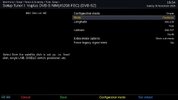
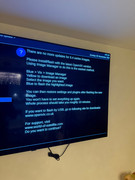
Sorry bud. Here are some photos/videos of my settings.

Software

OpenViX - 6.4 series (See photo)
Gigablue UE 4K HD

Tuner B settings
Config mode - Advanced / USALS set to yes
Looking at your photo above it looks like I need to switch to "simple"

I have put together a quick video of my settings

Note: Dish is physically on 16e right now and showing channels fine on Viark. I have not plugged my e2 in with the cable yet - but presumably it will know the dish is on 16e and clear 16e channels (assuming so!)

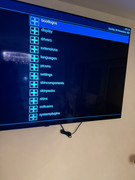
@kegnkiwi I have also uploaded what I see in the plugin menu - can't see a section for channel lists, though, if there is a IPK file of the channel list you recommend, I can probably Dreambox it to the box and use Putty to install it like I did with the latest version of OSCAM presumably if the commands are the same in the putty terminal to install the IPK like it was with the oscam file.


Video of setup ~ mp4: video.mp4
 
It's always a good idea to say which image (name and version/date) you are using.

You can take clear screenshots by following this guide
Code:
https://www.techkings.org/threads/taking-screen-shots-and-uploading-attachments-to-the-forum.131485/

To use USALS motor controls, you set your tuner with the wire to the motor as pictured. Obviously adjust to your co-ordinates like you did on the Viark.

View attachment 128860

Before you change it, could you please send the following command to your receiver using Putty/Terminal. Easier to paste instead of typing. It will create a file in /tmp listing your current tuner configuration. Can you please upload it just for curiosity's sake. If you set it for USALS, we may need you to test something else by adjusting the file called "settings". Some values persist and sometimes cause issues

Code:
cat /etc/enigma2/settings | grep config.Nims > /tmp/icz999_tunerconfig.txt

Thank you guys - I think that is where I have gone wrong on my e2 setup, I have it setup weirdly at 1.2 as I thought that was the only way to select USALS...

Which begs the question.... why it moved in the first place with such a weird config!

Just need to try to set this up now and find a channel list

I will paste code from Putty in 2 mins.
 
If you are on ViX 6.4, you won't be able to install anything from the plugin menus as the "feeds" I e plugin server were deleted to make space for newer images. Please flash newest 6.8 ViX image if you want to install things from the plugin server. You have a multiboot receiver, so you can use a different partition/slot without it affecting your current image.

No, the receiver will not know it's on 16e. When you start it, it will try to move the dish so that you can view the last used channel.
 
It's always a good idea to say which image (name and version/date) you are using.

You can take clear screenshots by following this guide
Code:
https://www.techkings.org/threads/taking-screen-shots-and-uploading-attachments-to-the-forum.131485/

To use USALS motor controls, you set your tuner with the wire to the motor as pictured. Obviously adjust to your co-ordinates like you did on the Viark.

View attachment 128860

Before you change it, could you please send the following command to your receiver using Putty/Terminal. Easier to paste instead of typing. It will create a file in /tmp listing your current tuner configuration. Can you please upload it just for curiosity's sake. If you set it for USALS, we may need you to test something else by adjusting the file called "settings". Some values persist and sometimes cause issues

Code:
cat /etc/enigma2/settings | grep config.Nims > /tmp/icz999_tunerconfig.txt


Just ran the code:


Struggling to find the file in /tmp on DCC though... I will keep looking. Looks like it created the file though.
 
Don't worry about sending that code, I see you have only configured 3 satellites.

Ok cool, thanks Abu.

As we have now figured out that my tuner settings were incorrect - should I still plug the box back in and change the config as above and scan sat's, or wait until I flash to latest version of ViX and download a channel list for the motor?

Tnx!
 
Back
Top