Satellite Z-gemma H7s slow to change channels

So i got a new USB (SanDisk 8G). I can see it on file manager and storage devices.

I unzipped Openvix on my laptop and transferred the unzipped file to the newly formatted USB (As per Openvix online instruction).
  1. Switched off the box at the back.
  2. Plugged in the USB at the back. No other USB's are in any ports.
  3. Switched the box back on and pressed/held the power button at the font behind the flap.
  4. Boot came up on the front panel and then FLASH, so quickly its hard to tell. Then back to boot.
  5. I released the button as soon as i saw Flash come up and its stuck in BOOT for the last 20 minutes.
The only thing i noticed is the root file is still zipped even after the parent file is unzipped. Not sure if this could be an issue, i tried to unzip it but its coming up as a error on my laptop.

Any ideas.
 
Lets explain in this way. I have a diesel car and I know I can only put diesel in it. My neighbour always like to prove me wrong so to prove his point put unleaded in the engine of his diesel car and the rest is history. The H7S can be flashed by usb for the first flash using the multizip image and thereafter can only be flashed online. You can only flash by usb again by using the EMMC recovery image that remains ZIPPED as its transferred to the usb. How do I know this? I have configured lots of H7S' and have never tried to reflash with a multizip image once it has already been flashed as it does not work.

So If was you I would try again with the ZIPPED recovery file and see if that works but it will delete everything and create 4 new partitions and the image you select will be in slot 1.

However, you may have knackered the box.

But you may want to prove me wrong.

To add if you are still confused just say so.

NB I did tell you this already in post 36, good luck.
 
Last edited:
Lets explain in this way. I have a diesel car and I know I can only put diesel in it. My neighbour always like to prove me wrong so to prove his point put unleaded in the engine of his diesel car and the rest is history. The H7S can be flashed by usb for the first flash using the multizip image and thereafter can only be flashed online. You can only flash by usb again by using the EMMC recovery image that remains ZIPPED as its transferred to the usb. How do I know this? I have configured lots of H7S' and have never tried to reflash with a multizip image once it has already been flashed as it does not work.

So If was you I would try again with the ZIPPED recovery file and see if that works but it will delete everything and create 4 new partitions and the image you select will be in slot 1.

However, you may have knackered the box.

But you may want to prove me wrong.

To add if you are still confused just say so.

NB I did tell you this already in post 36, good luck.
Ok so does that mean regardless of adding a second image you can only use recovery?
The box has pure2.
I want to use openvix, and upgrade pure 2 to the latest version, i used recovery for pure2 and multi for openvix?
 
When you say I used recovery for PURE2 and multi for Openvix means you are lost and are just chancing your arm. Your box may be knackered as well and stuck on Pure2. The process is quite simple but you have to follow instructions. Now that you have a usb that the box recognises the first thing you should do is ATTEMPT to update the PURE2 by using on the fly method. So download the latest version of PURE2 to the USB BUT dont unzip it. NB You have to re-format usb before you add new files. Then you try and see if the on the fly will work and flash to a new slot, you need the old image in case everything goes tits up, that's your fallback. If that does not work and you get an error then the next step is to use the recovery method and this is where you should use openvix recovery as I explained. You will lose the PURE2 image.

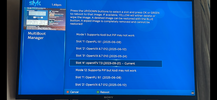
I have the latest version of the H7S in front of me and when I press and hold the power button I get a multiboot option that shows , see pic, the slots. I will try a pure2 in a litte while. its a slyk q skin with openatv 7.3
 

Attachments

  • IMG_9737.PNG
    IMG_9737.PNG
    289.8 KB · Views: 45
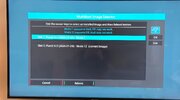
Now you are getting there, you only have 1 image. You are in the USE Kodi version and I dont use that version ever. What you should do is boot to the mode 12 version and then try the on the fly method.

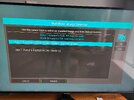
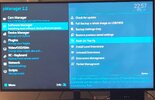
Now this is where you have to be careful as its possible Pure2 has allocated only one partition and in that case you would have to go to PURE2 support. So when you go to on the fly it may state flash to where current image is and remove the old.

You can only try but go slow.
 
Now you are getting there, you only have 1 image. You are in the USE Kodi version and I dont use that version ever. What you should do is boot to the mode 12 version and then try the on the fly method.

Now this is where you have to be careful as its possible Pure2 has allocated only one partition and in that case you would have to go to PURE2 support. So when you go to on the fly it may state flash to where current image is and remove the old.

You can only try but go slow.
Perfect. Seeing that i need to take my time ill leave it until tomorrow. School run time and kids wont help concentration levels.

What do u mean by boot to mode 12 version. Is this downloaded like a recovery file?
 
Hi all.

I have a Z-gemma H7S which is starting to take a few seconds to change channels and move between IPTV channels and folders.
I have notice when i try to do an update on the zgemma it tells me no updates are available. It on pure 2 version 6.5 build 001.
It hasn't upgraded since 2023.

Not sure if this is the issue or how to fix it.
Any help would be appreciated.
What skin are you using? I've found some skins cause this to happen on my Zgemma H92S. Try changing to one of Kippac's skins under plugins\skins see if that helps
 
I have to ask did you put the image file on new usb unzipped and is box connected to internet. And you could check the iptv with existing image and may have resolved problem. I fall asleep soon I did not get a chance to load pure2 yesterday and last time I used it wac2020:fearscream:
 
Last edited:
With regards to flashing with the remote, Use FTP, check HDD for folders that contain image files. Folder names could be:
Images
Downloaded images
Image backups

Once you find the folder, transfer the zipped image file to the folder, you should then be able to flash it.
 
With regards to flashing with the remote, Use FTP, check HDD for folders that contain image files. Folder names could be:
Images
Downloaded images
Image backups

Once you find the folder, transfer the zipped image file to the folder, you should then be able to flash it.
Thanks Abu.
I used filezile last weekend and there was a can of worms regarding files.
I wasn't a 100% what the main file was.
 
Back
Top