internal. Came with the box. YA i have a lot of recordings, if i could get filezila or an alternative working i could extract them and reformat. What would i be formatting to?No it came up on previous pics. Have you the HDD internal or is it external via USB? And have you many recordings, you can reformat HDD to ext4 but it deletes everything.
You are using an out of date browser. It may not display this or other websites correctly.
You should upgrade or use an alternative browser.
You should upgrade or use an alternative browser.
Satellite Z-gemma H7s slow to change channels
- Thread starter Anthony2021
- Start date
Openvix should i not select pure2 ?No it came up on previous pics. Have you the HDD internal or is it external via USB? And have you many recordings, you can reformat HDD to ext4 but it deletes everything.
Or try this go back to flash online by menu setup software management flash online and yellow should say distribution so press yellow and you should get this but wait as it downloads, then you are going to select openvix, click on it and flash file at top, green button to empty slot 3..
This Flash online needs the USB freshly formatted with zipped files?

cactikid
VIP Member
When you said you could not use FileZilla i began to wonder if on your box you setup a password to use?
FileZilla now wants you to enter it into it to connect to box..
If not aware of it you get shut out as cannot connect.
I dont and wont format a hdd or ssd with recordings on it.
All the best
FileZilla now wants you to enter it into it to connect to box..
If not aware of it you get shut out as cannot connect.
I dont and wont format a hdd or ssd with recordings on it.
All the best
I'm after getting WINSCP working.
Below is a screen shot of the files in the box. Not sure where i go after that. But at least i can save my recordings.
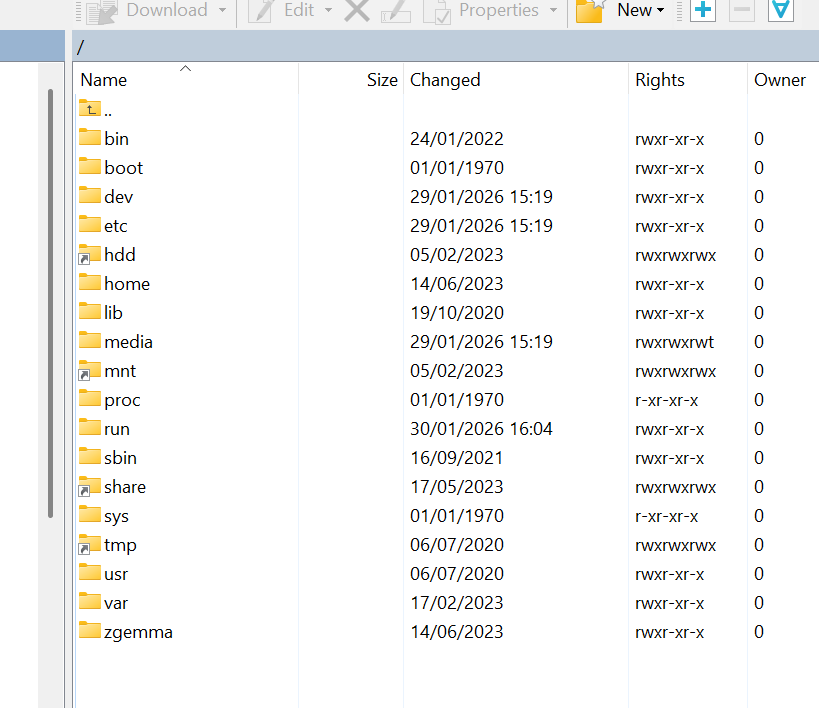
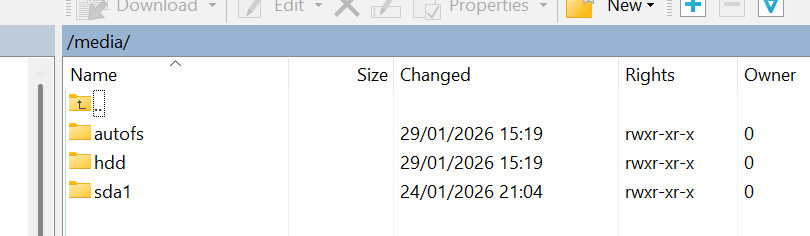
Below is a screen shot of the files in the box. Not sure where i go after that. But at least i can save my recordings.
No we tried pure and IMAGE will flash online to slot 3, do as you are told
Its openvix multi i'm downloading not recovery?
All im doing is clearing out the HDD of recordings.DONT JUMP AHEAD I'LL LOSE TRACK
Then i reformat it.
Flash using openvix.
The suspense is building.No, you just flash openvix online and leave HDD for now. All will be revealed.
Ok so im clear and going slow.
Which one of these should i download
Then its the usual procedure after that.
Insert USB
pManager, software and flash on the fly.
Choose slot 3 (empty slot) and flash.
Is the box powered off at ant stage? before I insert USB?
hang on a minute you cant see the recovery file when you use flash online, have you gone to flash online and press yellow, like i instructed it says distribution, you don#t download anything, you are fixated on old stuff, you have to follow the steps, its basic now, go to flash online press yellow take a pic. If did as I instructed you would get to the screen in the pic.
This is getting close to a wind up
This is getting close to a wind up
Attachments
Abu Baniaz
TK Veteran
Just follow the prompts on screen. It will flash the image and ask if you want to reboot after it completes. You don't have to connect usb or do anything during this method of flashing. If you reboot the box whilst it's flashing, you could damage your receiver.
Images attached.hang on a minute you cant see the recovery file when you use flash online, have you gone to flash online and press yellow, like i instructed it says distribution, you don#t download anything, you are fixated on old stuff, you have to follow the steps, its basic now, go to flash online press yellow take a pic. If did as I instructed you would get to the screen in the pic.
This is getting close to a wind up
Attachments


manic01
VIP Member
I was just about to posthang on a minute you cant see the recovery file when you use flash online, have you gone to flash online and press yellow, like i instructed it says distribution, you don#t download anything, you are fixated on old stuff, you have to follow the steps, its basic now, go to flash online press yellow take a pic. If did as I instructed you would get to the screen in the pic.
This is getting close to a wind up
When you did lolMaybe it's a wind up
This is an image from inside the sda1/images folder. Might help.

pabloescaban
VIP Member
Right, like i said last night, iptv was struggling with channel changes yes?
Are you still using the same image as you were in post #1?
Is there any reason why you HAVE TO use pure2 image?
Ive a feeling your epg is causing most, if not all of your problems. You have it stored on internal flash, to make matters worse, it updates every hour which is probably why your RAM is also struggling.
You could probably leave the existing image in use if you just did a bit of maintenance and the channel sluggishness would probably rectify itself
Are you still using the same image as you were in post #1?
Is there any reason why you HAVE TO use pure2 image?
Ive a feeling your epg is causing most, if not all of your problems. You have it stored on internal flash, to make matters worse, it updates every hour which is probably why your RAM is also struggling.
You could probably leave the existing image in use if you just did a bit of maintenance and the channel sluggishness would probably rectify itself
This what u mean?No you have to test the network and be positive it’s working and you are near the end of. Go to plugin browser and click on button that downloads the plugins it should populate and how fast is your. Broadband. Away at minute
Went to plug ins, green button and setting popped up in a couple of secs.